Fairchild Republic A-10 Thunderbolt II
The Fairchild Republic A-10 Thunderbolt II, also widely known by the nickname A-10 Warthog, is a single-seat, twin-turbofan, straight-wing, subsonic attack aircraft developed by Fairchild Republic for the United States Air Force (USAF). In service since 1977, it is named after the Republic P-47 Thunderbolt strike-fighter of World War II, but is instead commonly referred to as the "Warthog" (sometimes simply "Hog").[3] The A-10 was designed to provide close air support (CAS) to ground troops by attacking enemy armored vehicles, tanks, and other ground forces; it is the only production-built aircraft designed solely for CAS to have served with the U.S. Air Force.[4] Its secondary mission is to direct other aircraft in attacks on ground targets, a role called forward air controller (FAC)-airborne; aircraft used primarily in this role are designated OA-10.
Overall Progress
32%Featured Panels
Panels

A General Front Console Hardwares
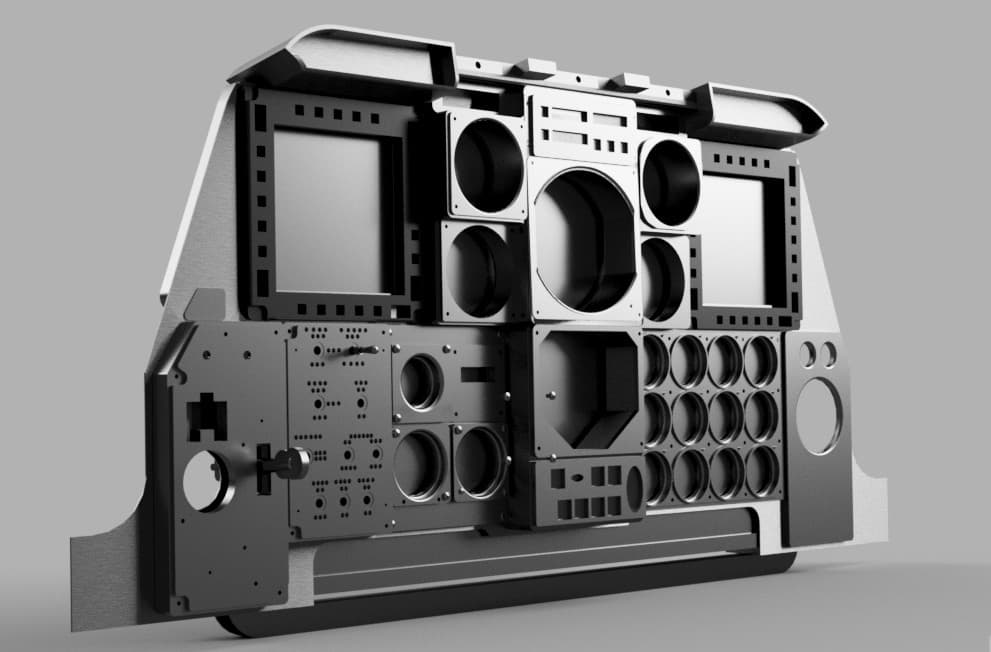
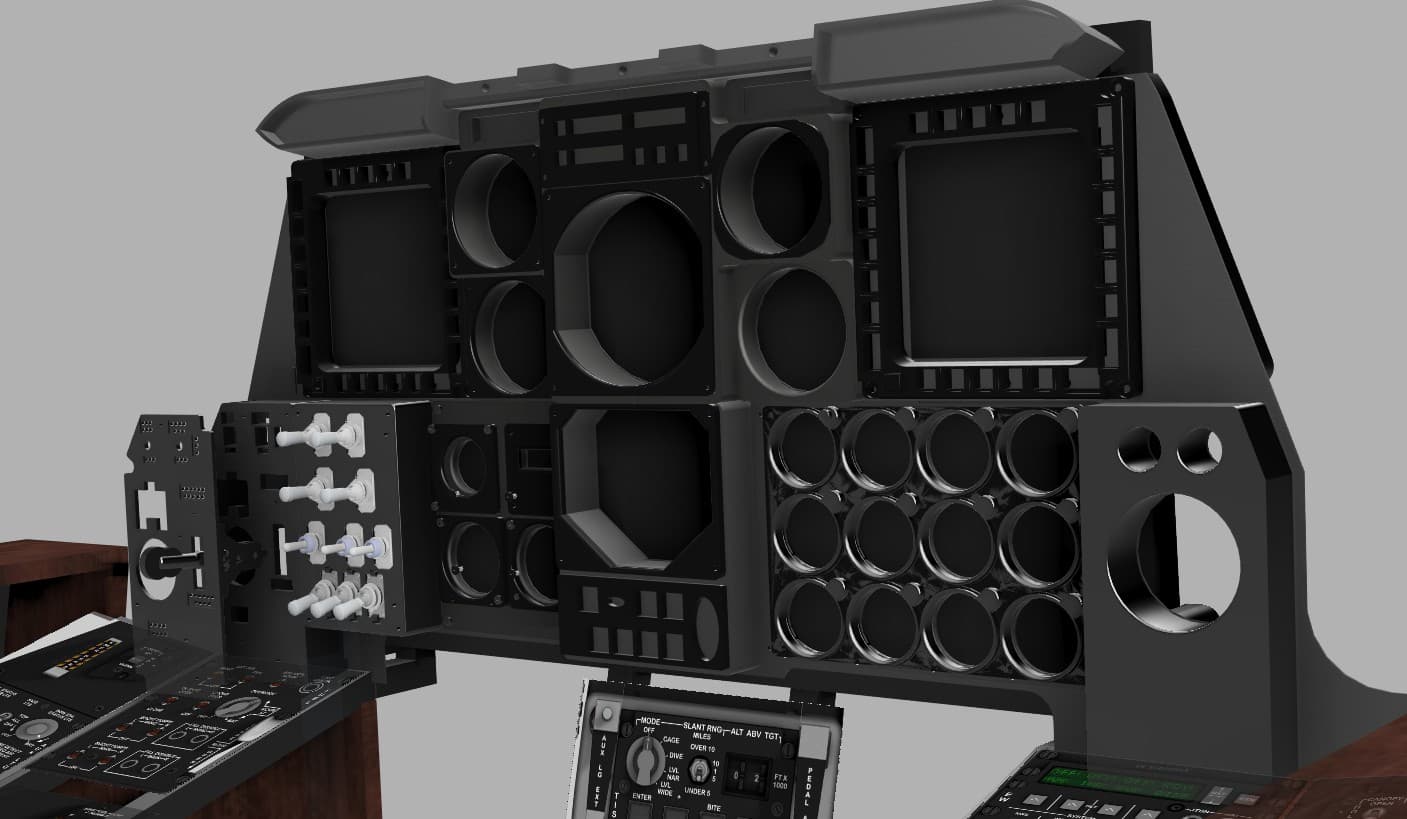
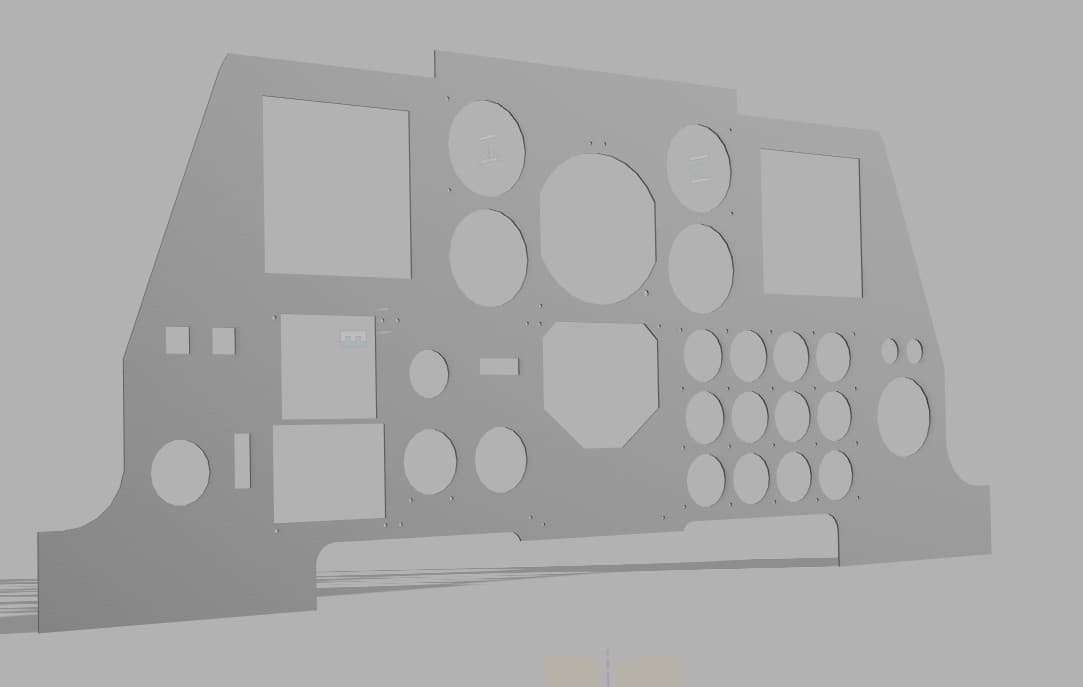
The panels are designed and built modular and 3D printed. The objective was to build something large in a small 3D printer. Thus I decided to design all panels separately and to fuse them together after fabrication. A flat and smooth back surface was required in order to accommodate an LCD panel for the instrument readings. So, in order to keep the proper real life proportions, I was limited to building each layer and fit all electronics in a very narrow space. I designed a back panel that could be laser cut in aluminum or other material, but this would raise the cost. So I opted for sectioning the entire structure into pieces that would fit the 3D printer build plate. These parts will then be merged with epoxy resin, and the individual panels bolted to its front surface. This would be solid and strong enough for the purpose and a decision was made to keep this solution on this initial version.

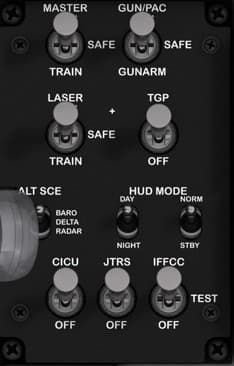
AHCP Panel
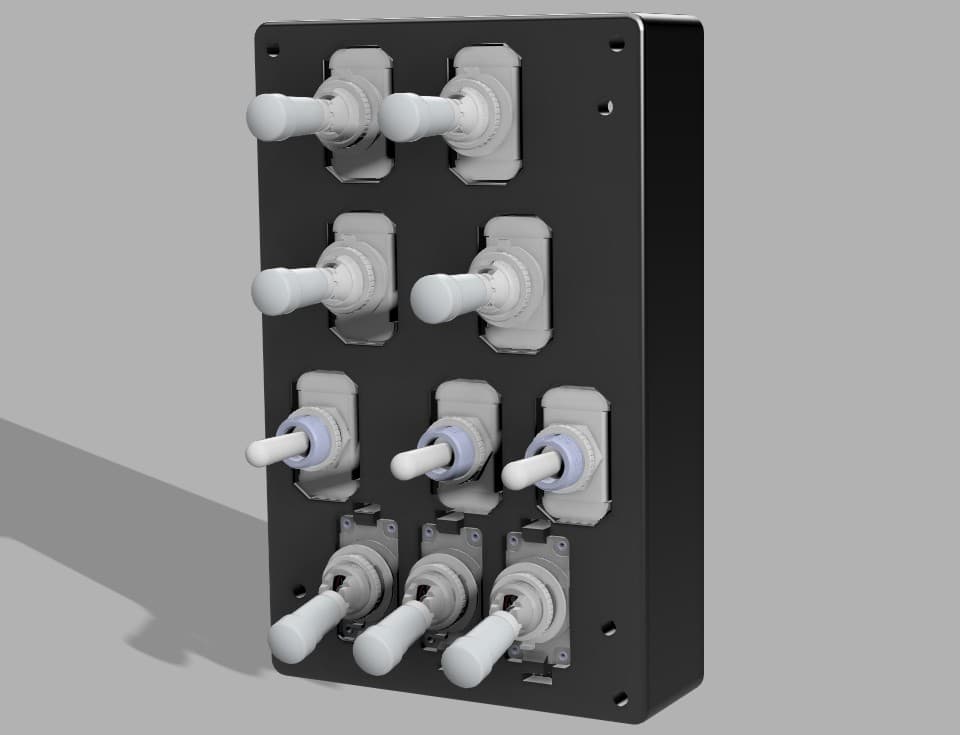
Function Description: The Armament and Control Panel governs the A-10C’s weapon system arming, targeting, and avionics control logic. It enables or disables subsystems like the GUN/PAC, TGP (Targeting Pod), and IFFCC (Integrated Flight & Fire Control Computer). It also sets HUD display modes and altitude source configuration. This panel is essential for switching between training, safe, and combat states and coordinating the aircraft’s fire-control systems. Control Elements and Functions MASTER ARM Switch Positions: TRAIN / SAFE / ARM Function: TRAIN: Enables weapon system simulation only (no actual weapon release). SAFE: Disables all weapon firing. ARM: Enables live weapon release. Type: 3-position fixed toggle (ON–OFF–ON). GUN/PAC Switch Positions: SAFE / GUNARM Function: SAFE: Disables gun and PAC (Precision Attitude Control). GUNARM: Activates gun firing and PAC stabilization mode. Type: 2-position fixed toggle (ON–ON). LASER Switch Positions: TRAIN / SAFE Function: Controls the laser firing circuit for the TGP (Targeting Pod). TRAIN: Simulated laser firing (no emission). SAFE: Laser disabled. Type: 2-position fixed toggle (ON–ON). TGP Switch Positions: OFF / ON Function: Powers the Targeting Pod for laser and targeting functions. Type: 2-position fixed toggle (ON–ON). ALT SCE Switch Positions: BARO / DELTA / RADAR Function: Selects altitude source for the HUD and targeting systems: BARO: Uses barometric altitude. DELTA: Uses offset reference. RADAR: Uses radar altimeter data. Type: 3-position fixed toggle (ON–OFF–ON). HUD MODE Switch Positions: DAY / NIGHT / STBY Function: DAY: Bright display for daylight operation. NIGHT: Dimmed HUD for night missions. STBY: Turns off the HUD. Type: 3-position fixed toggle (ON–OFF–ON). CICU Switch Positions: OFF / ON Function: Powers the Central Interface Control Unit, managing data flow between avionics and weapons systems. Type: 2-position fixed toggle (ON–ON). JTRS Switch Positions: OFF / ON Function: Controls Joint Tactical Radio System power. Type: 2-position fixed toggle (ON–ON). IFFCC Switch Positions: OFF / TEST / ON Function: OFF: Disables the fire control computer. TEST: Enters diagnostic mode. ON: Normal operation. Type: 3-position fixed toggle (ON–OFF–ON).

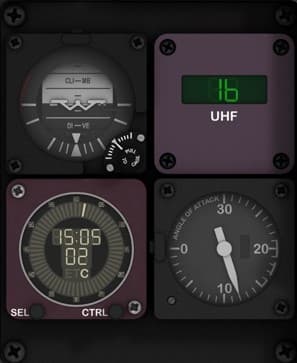
Auxiliary Flight Instruments Cluster
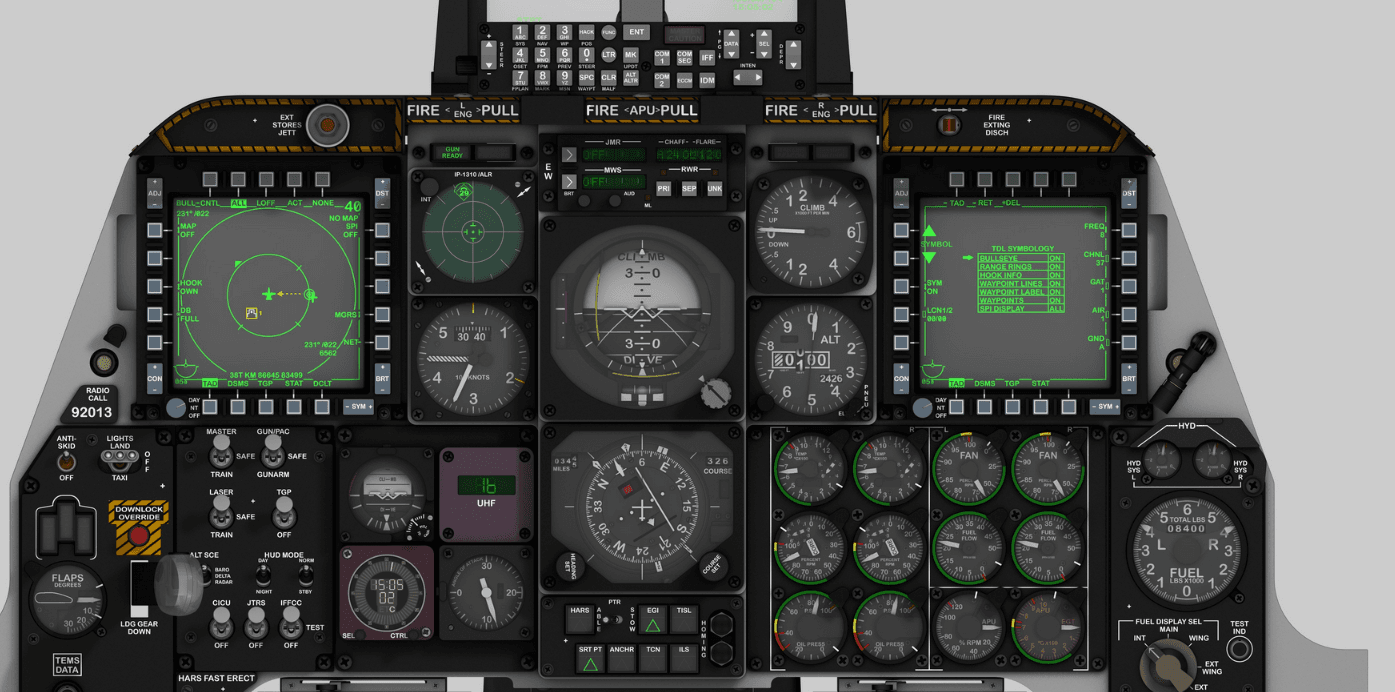
Function Description: This section of the A-10C main instrument panel houses a group of four essential analog and digital instruments providing backup and reference data for flight attitude, communications, and flight performance. It allows the pilot to maintain key situational awareness parameters in the event of primary display failure or during routine flight checks. Control Elements (Top Left – Bottom Right): Standby Attitude Indicator (SAI) Function: Displays aircraft pitch and roll relative to the horizon, independent of the main flight computer. Type: Gyroscopic instrument. Controls: • Pull-to-cage knob (momentary, mechanical). • Adjustment knob (rotary potentiometer). UHF Frequency Display (UHF Control Repeater) Function: Displays the currently selected frequency of the UHF radio system. Type: Digital display, receives input from UHF radio control panel. Controls: None on this panel (read-only repeater). Digital Clock / Elapsed Time Counter (ETC) Function: Provides UTC time, local time, and stopwatch functionality. Controls: • SEL (Select) button – momentary pushbutton. • CTRL (Control) button – momentary pushbutton. Type: Digital display with two tactile switches. Angle of Attack (AOA) Indicator Function: Indicates the current angle of attack (α) — the angle between the wing chord line and relative airflow, crucial for stall prevention and precise approach control. Type: Analog gauge (servo-driven in the real aircraft). Controls: None. Suggested Hardware Components: Standby Attitude Indicator: simulated via LCD or servo-driven artificial horizon module (e.g. 2-axis servo gimbal). UHF Display: 7-segment LED module or small OLED for frequency repeater. Clock (ETC): small digital display module with two tactile pushbuttons. AOA Indicator: analog servo or stepper gauge (SG90 micro servo or X27.168 automotive stepper). Buttons: 2x momentary pushbuttons (SEL and CTRL). Notes for Labeling and Backlighting: Backlight color: green or warm white for analog gauges; dimmable LED for digital modules. Engrave legends “SEL” and “CTRL” on the lower digital clock panel. Ensure uniform diffusion for the digital modules using a thin (0.5–1mm) frosted acrylic overlay. Recommended material: • 3mm black-painted clear acrylic front (laser engraved labels). • 5mm mid-layer for component seating and LEDs.

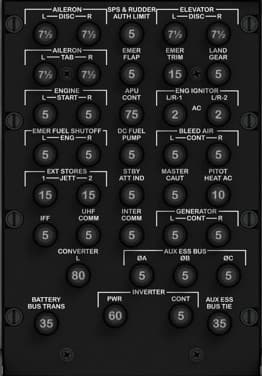
Circuit Breaker (CB) Panel — Left Front Console (Breaker Out Panel)
Location Front lower console, directly below the TISL panel, positioned between the pilot’s knees. This panel forms the bottom section of the front console. Purpose Provides electrical protection and circuit isolation for essential aircraft systems. Each breaker corresponds to a specific subsystem (flight controls, hydraulics, communications, lights, generators, etc.), allowing manual reset or disconnection in case of overloads or electrical faults. Layout Overview The A-10C’s breaker panel is divided into functional groups — each row protecting a major aircraft system. Below is the typical layout and function by row and label, matching the real aircraft: Row Left Center Left Center Right Right 1 AILERON DISC R SPS & RUDDER AUTH LIM ELEVATOR DISC R LAND GEAR 2 AILERON TAB R EMER FLAP EMER TRIM LAND GEAR L & R 3 ENGINE START APU CONT FUEL PUMP BLEED AIR 4 EMER FUEL SHUTOFF ENG DC FUEL PUMP MASTER CAUT PITOT HEAT AC 5 EXT STORES JETT STBY ATT IND IFF UHF COMM 6 INTER COMM GENERATOR CONT CONVERTER 7 BATTERY BUS TRANS PWR INVERTER AUX ESS BUS AUX ESS BUS TIE

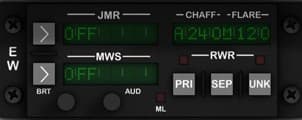
CMSC Control Panel AN/ALQ-213
Function Description: This panel controls the A-10C’s self-protection and threat-avoidance systems. It manages the aircraft’s Electronic Warfare Suite, including radar warning (RWR), missile warning (MWS), jammer control (JMR), and chaff/flare countermeasure programs. It allows the pilot to monitor, activate, and configure automatic or manual countermeasure modes to defend against radar-guided and infrared threats. Control Elements: JMR (Jammer) Display and Controls • Function: Controls and displays jammer status (ON/OFF, mode, and fault). • Controls: – Left arrow button: momentary pushbutton (mode select or toggle). – Right arrow button: momentary pushbutton (confirmation or submenu select). – BRT knob: rotary potentiometer for display brightness. MWS (Missile Warning System) Display and Controls • Function: Monitors infrared/UV missile warning sensors and displays system state. • Controls: – Left arrow button: momentary pushbutton. – Right arrow button: momentary pushbutton. – AUD knob: rotary potentiometer for system audio volume. RWR (Radar Warning Receiver) Section • Function: Controls radar threat detection display and chaff/flare program selection. • Controls: – Three rectangular momentary pushbuttons labeled PRI, SEP, and UNK (Primary, Separate, and Unknown signal filter modes). – Two small status LEDs (above the buttons). Chaff/Flare Counter Display • Function: Indicates current chaff/flare loadout and dispensing program (e.g., A240/M120). • Type: Green alphanumeric LED or OLED display (read-only). Side Selector (E–W) • Function: Electronic Warfare Power switch – toggles ECM master control. • Type: 3-position fixed toggle (E – center – W). ML (Mode Lamp) • Function: Status indicator lamp. • Type: 3 mm green LED (ON when countermeasure program active). Suggested Hardware Components: 7× momentary pushbuttons (for arrows and RWR modes). 2× rotary potentiometers (10 kΩ linear) for brightness and volume. 1× 3-position toggle switch (ON–OFF–ON type). 3× LED displays or OLED screens for JMR, MWS, and Chaff/Flare indicators. 2× 3 mm LEDs for status indicators. Notes for Labeling and Backlighting: Backlight color: green (to match A-10C avionics illumination). Font: Eurostile or Futura-type, all caps, white engraving. Panel layout: 3 mm top acrylic (engraved, black-painted), 5 mm mid-layer for buttons/LEDs, and 1.5 mm rear spacer for wiring. Ensure LED diffusion across each display aperture using thin frosted film.

Engine and APU Instrument Cluster
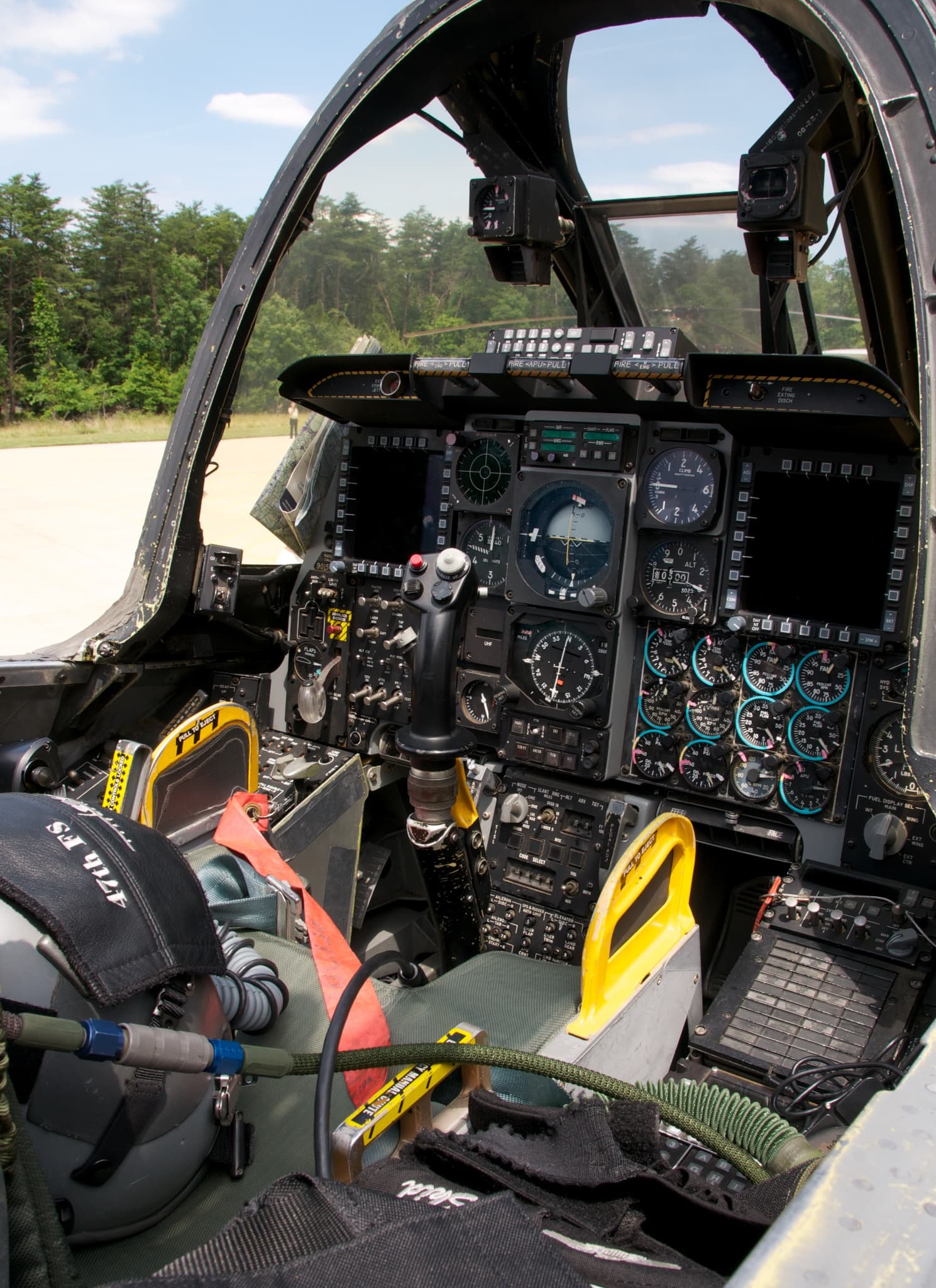
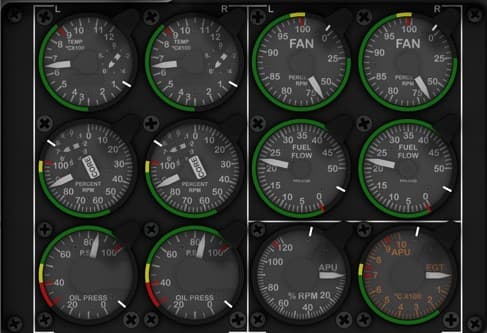
Function Description: The Engine and APU Instrument Cluster provides all critical engine performance and status indications for the A-10C. It displays parameters such as fan speed, core speed, oil pressure, temperature, fuel flow, and exhaust gas temperature (EGT) for both left (L) and right (R) engines, plus indicators for the Auxiliary Power Unit (APU). This cluster allows the pilot to monitor engine health, manage throttle settings, and confirm engine start sequences. Instrument Descriptions 1. Left Engine – Temperature (TEMP L) Function: Indicates left engine turbine temperature (°C × 100). Type: Analog gauge (servo/stepper-driven). Scale: 0 – 12 × 100 °C. 2. Right Engine – Temperature (TEMP R) Function: Indicates right engine turbine temperature (°C × 100). Type: Analog gauge (servo/stepper-driven). Scale: 0 – 12 × 100 °C. 3. Left Engine – Fan Speed (FAN L) Function: Displays the low-pressure fan RPM percentage of the left engine. Type: Analog gauge. Scale: 0 – 110 %. 4. Right Engine – Fan Speed (FAN R) Function: Displays the low-pressure fan RPM percentage of the right engine. Type: Analog gauge. Scale: 0 – 110 %. 5. Left Engine – Core Speed (CORE L / N2%) Function: Indicates the high-pressure core compressor RPM percentage. Type: Analog gauge. Scale: 0 – 110 %. 6. Right Engine – Core Speed (CORE R / N2%) Function: Indicates the high-pressure core compressor RPM percentage. Type: Analog gauge. Scale: 0 – 110 %. 7. Left Engine – Fuel Flow (FF L) Function: Measures fuel flow to the left engine in pounds per hour (PPH × 1000). Type: Analog gauge. Scale: 0 – 12 × 1000 PPH. 8. Right Engine – Fuel Flow (FF R) Function: Measures fuel flow to the right engine in pounds per hour (PPH × 1000). Type: Analog gauge. Scale: 0 – 12 × 1000 PPH. 9. Left Engine – Oil Pressure (OIL L) Function: Displays oil pressure for the left engine in PSI. Type: Analog gauge. Scale: 0 – 100 PSI, color-coded (Red/Yellow/Green). 10. Right Engine – Oil Pressure (OIL R) Function: Displays oil pressure for the right engine in PSI. Type: Analog gauge. Scale: 0 – 100 PSI, color-coded. 11. APU – RPM Function: Indicates the APU turbine speed as a percentage of maximum RPM. Type: Analog gauge. Scale: 0 – 120 %. 12. APU – EGT Function: Displays the Exhaust Gas Temperature of the APU in °C × 100. Type: Analog gauge. Scale: 0 – 12 × 100 °C.

External Stores Jettison Panel
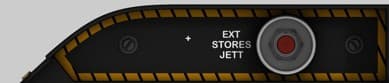
Function Description: The External Stores Jettison Panel provides a dedicated, emergency function to release all external stores from the aircraft pylons. When pressed, the jettison button sends an electrical signal to disengage the bomb rack latches, instantly releasing external fuel tanks or ordnance. This feature is used in critical situations, such as engine flameout recovery, drag reduction, or combat damage avoidance. Control Description EXT STORES JETT Button Function: Instantly releases all external stores (fuel tanks, bombs, or pods). Action: Momentary push-button; must be pressed deliberately to activate. Safety: In the real A-10C, this button is guarded or recessed to prevent accidental activation. Type: Momentary push button (normally open). Label: “EXT STORES JETT” (white text, black background with yellow hazard border). Suggested Hardware Components Push Button: 1 × Momentary push button, red cap (12–16 mm diameter). Optional: Guarded or recessed mounting for safety authenticity. Backlighting: Yellow/amber LED strip beneath hazard border for realism. Optional white LED behind text for illumination. Panel Build Recommendation Top Layer: 3 mm clear acrylic, front-painted black with engraved text and hazard stripes (engrave lightly for clean yellow paint infill). Mid Layer: 5 mm support for button housing and LED mount. Rear Layer: 2 mm mounting plate for electronics.

Fire Extinguisher Discharge Panel
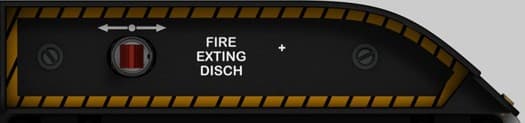
Location Front lower right side of the cockpit, below the TISL and Circuit Breaker panels, positioned just above the sidewall edge near the pilot’s right thigh. Purpose Provides manual control for the engine and APU fire suppression system, allowing the pilot to discharge fire extinguishing agent into the designated compartment in the event of an onboard fire. Controls & Indicators FIRE EXTING DISCH Handle Type: Sliding or guarded pull handle (mechanical actuator). Function: When pulled or pushed, discharges one of two fire extinguisher bottles into the selected engine or APU bay. Mechanically linked to the fire extinguisher control valve. The action is irreversible once triggered (real aircraft). Indicator Light (Optional in Simpit Version) Color: Red or amber backlight (in real aircraft, may not illuminate). Function: Indicates system armed or discharge triggered status. Recommended Hardware (Simpit Build) Component Type / Notes Handle 3D-printed cylindrical or rectangular handle with red transparent tip Sensor Momentary push button or limit switch (detects full travel for signal trigger) Mount 3 mm acrylic panel with yellow/black hazard engraving Optional feedback Red LED behind translucent handle for “armed/discharged” feedback Safety Mechanical spring return (optional, for realism only)

Front Console Electronic I/O
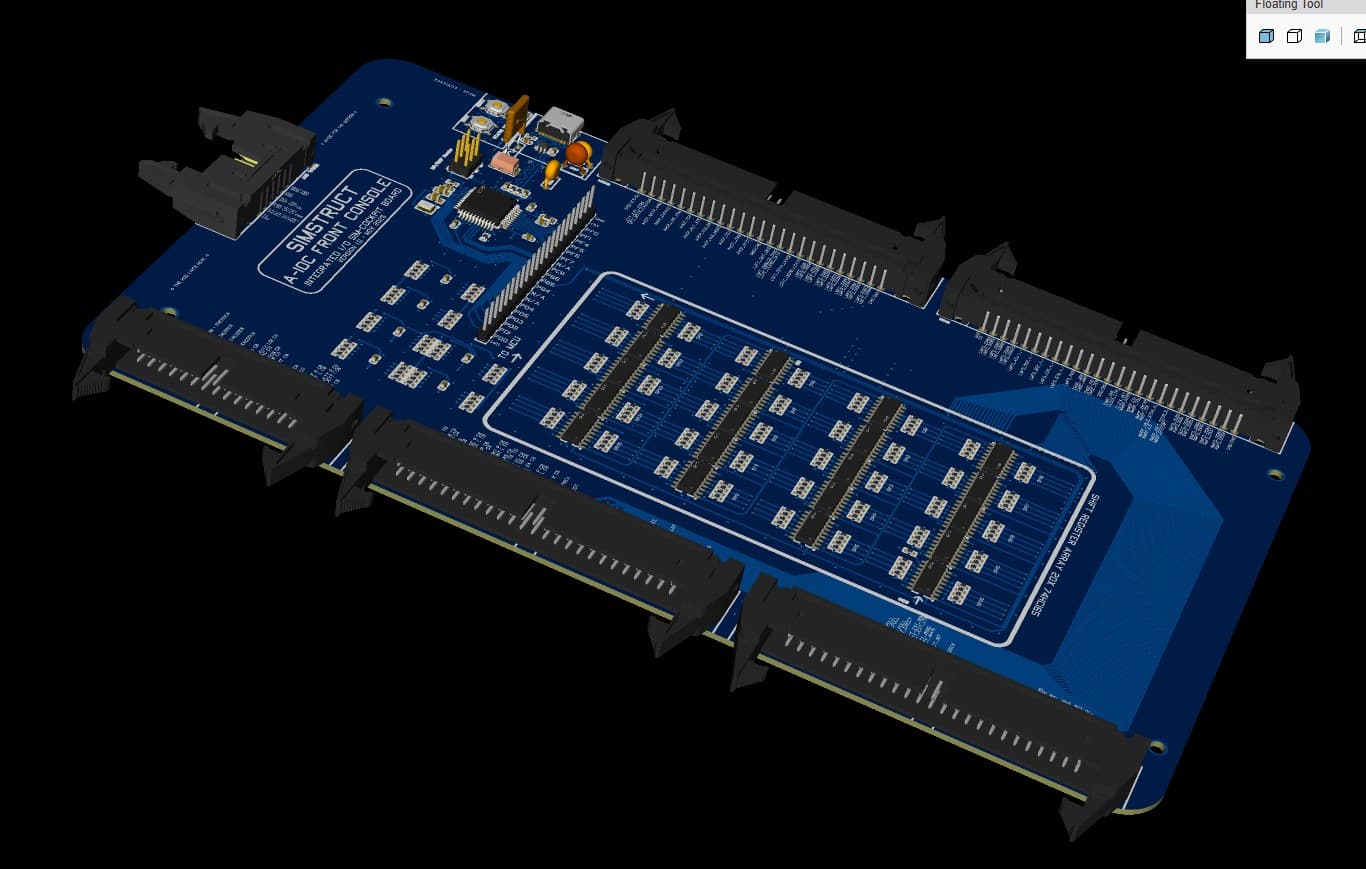
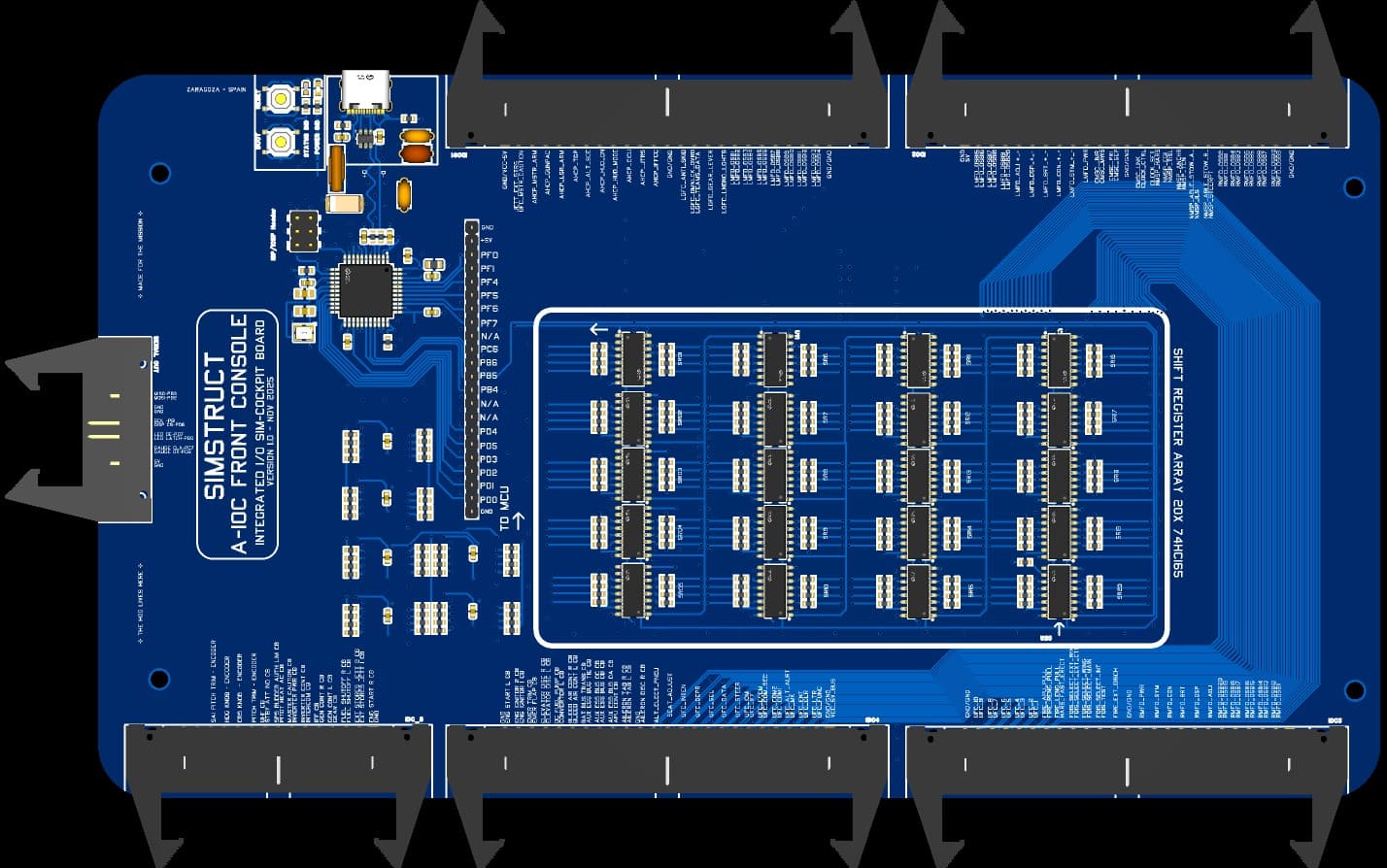
Integrated I/O Interface for High-Fidelity Cockpit Builds The Simstruct A-10C Front Console Input Board is the central nervous system of your cockpit. Designed from the ground up for maximum reliability, clean wiring, and true A-10C mapping, this board brings every switch, encoder, button, and panel control from the front console into a single, unified hub. Built around a USB-native ATmega32U4 microcontroller and a high-density array of 74HC165 input shift registers, it offers over 160+ digital inputs, clean signal conditioning, and fully protected USB-C connectivity. Every pin is mapped to real DCS-BIOS functions and cockpit labels to make wiring intuitive and error-free. Key Features 160+ Debounced Digital Inputs 20× 74HC165 shift registers for rock-solid switch capture. True Plug-and-Play DCS Integration Comes pre-mapped with A-10C naming conventions for instant recognition. USB-C Power & Data with Full Protection Includes ESD diodes, fuse protection, CC resistors, and differential-pair routing for safe, clean operation. On-Board High-Stability MCU ATmega32U4 running native USB HID/Serial for full DCS-BIOS compatibility. Four 50-Pin IDC Panel Connectors Clean routing of all front-console panels into the board with minimal cabling. Future-Proof Serial Expansion Port Includes a dedicated bus to connect the upcoming Output Board (LEDs, displays, gauges, counters). Industrial-Grade PCB Layout Professional grounding, isolated VBUS region, solid decoupling, and ferrite-filtered AVCC for stable analog performance. Designed for Real Builders Mechanical design, silkscreen labeling, and connector placement match the real A-10C front console layout — reducing build time and wiring confusion. This input board is the foundation of the complete Simstruct Front Console System: robust, expandable, and engineered for long-term cockpit projects.

Fuel Hydraulic Indicator Panel
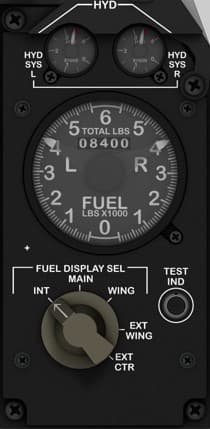
Function Description: The Fuel and Hydraulic Indicator Panel provides real-time readouts for the aircraft’s fuel distribution and hydraulic system pressures. It allows the pilot to monitor fuel levels in all tanks (internal and external) and the status of hydraulic systems A and B, both critical for flight control and gear operation. This panel includes a rotary selector to display different tank readings and a test function for system verification. Instrument and Control Descriptions 1. Hydraulic System Pressure Gauges (HYD SYS L / HYD SYS R) Function: Displays the hydraulic pressure for the left and right systems. Scale: 0 – 3,500 PSI. Type: Analog dual gauge (two independent needles). Indications: Green zone: Normal operating range (~3,000 PSI). Yellow/red: Low pressure warning zones. Type of Control: None (indicator only). 2. Fuel Quantity Indicator (FUEL LBS × 1000) Function: Indicates total and per-tank fuel load (Left, Right, and Center). Readout: Upper counter: Total fuel (in thousands of pounds). Dial pointers: Left, Right, and Center tank levels. Scale: 0 – 7,000 lbs per tank. Type: Multi-needle analog gauge (servo/stepper-driven). 3. Fuel Display Selector Knob (FUEL DISPLAY SEL) Function: Selects which fuel tanks are displayed on the fuel indicator. Positions: INT: Internal tanks only. MAIN: Main tanks (fuselage). WING: Wing tanks. EXT WING: External wing tanks. EXT CTR: External center tank. Type: 5-position rotary switch. 4. Test Indicator Button (TEST IND) Function: Initiates a self-test for the fuel and hydraulic indication systems. Action: When pressed, it simulates nominal readings for instrument verification. Type: Momentary push button (normally open).

Landing Gear Control Panel (LGCP)
This Panel is located to the bottom left of the front console and has: -The Landing gear lever -Anti skid on - on Toggle Switch. -Landing Lights on-off-on toggle switch with a 3d printed attachment for handle. -Well lock LED Indicator x3 -Flaps position gauge. (Servo Motors) -Landing gear lever. -Teams Data push button (Mom)

MFCD (Multi-Function Color Display)
Function Description: The Left MFCD is one of the two main digital multifunction displays in the A-10C cockpit. It provides real-time situational awareness and control over several aircraft systems such as navigation, targeting, weapons delivery, and communication. It can display a variety of pages including the Tactical Awareness Display (TAD), Digital Stores Management System (DSMS), Targeting Pod (TGP), and more. The MFCDs are the pilot’s primary interface for modern avionics in the A-10C. Control Elements: 20 push buttons (OSBs – Option Select Buttons) surrounding the screen (5 on each side, 10 total per MFCD). • Type: Momentary pushbuttons • Function: Each button corresponds to contextual functions shown on the MFCD bezel screen edge. 2 rotary knobs (bottom left and bottom right corners). • DAY/NIGHT/OFF switch: 3-position rotary switch for screen brightness mode. • SYM/BRT rotary: Continuous rotary potentiometer for display symbol brightness adjustment. Optional backlight control via secondary knob or software dimming. Suggested Hardware Components: 20x momentary tactile pushbuttons (round or square 12mm type, with LED optional). 1x rotary 3-position switch (ON-OFF-ON or ON-ON-ON depending on wiring logic). 1x rotary potentiometer (10kΩ linear) for brightness control. Optional: 3D printed bezel or CNC/laser-cut acrylic frame with engraved button legends. Notes for Labeling and Backlighting: Backlighting color: green (to match A-10C illumination). Engrave all bezel legends (e.g. BRT, SYM, DAY/NIGHT/OFF) on the acrylic top layer. LED light diffusion behind each button should be even; small 3mm green LEDs are ideal. Recommended acrylic stack: • 3mm top engraved panel (black-painted clear acrylic, laser-etched text). • 5mm middle layer for buttons and LED mounts. • LCD screen behind (usually 4.3"–5" display for simulated use).

Primary Flight Instrument Cluster
Function Description: This is the central core of the A-10C’s flight instrumentation system. It provides the pilot with continuous feedback on the aircraft’s flight attitude, altitude, climb rate, airspeed, navigation heading, and radar threat awareness. These analog instruments act as the pilot’s primary situational awareness tools—both during normal flight and as backups in case of MFD or HUD failure. Instruments Overview (Top to Bottom, Left to Right) 1. Radar Warning Receiver (RWR) – AN/ALR-69 Display Function: Displays radar emitters detected around the aircraft, including tracking and missile launch signals. Indicators: Threat direction, type, and priority (flashing when lethal). Type: Circular CRT-style radar display. Controls: INT knob (intensity – rotary potentiometer). GUN READY indicator light (green LED). 2. Vertical Velocity Indicator (VVI) Function: Displays climb or descent rate in thousands of feet per minute. Scale: -6,000 to +6,000 ft/min. Type: Analog gauge (servo or stepper-driven). Controls: None. 3. Airspeed Indicator Function: Shows aircraft speed in knots (KIAS). Range: 0–500 knots. Type: Analog gauge (servo or stepper-driven). Controls: None. 4. Attitude Director Indicator (ADI) Function: Displays aircraft pitch, roll, and flight director information. Type: Electro-mechanical gyro (in simulation: servo-driven or LCD-rendered). Controls: Pitch adjustment knob (rotary potentiometer). Cage knob (momentary pull). 5. Altimeter Function: Displays aircraft altitude in feet above sea level. Scale: 0–50,000 ft. Sub-display: Barometric pressure setting (inHg). Type: Analog gauge (servo or stepper-driven). Controls: Barometric pressure knob (rotary potentiometer). 6. Horizontal Situation Indicator (HSI) Function: Combines heading, navigation, and course information. Features: Compass card, course pointer, deviation bar, and distance counter. Type: Electro-mechanical gyro or digital compass simulation. Controls: Heading Set knob (rotary encoder). Course Set knob (rotary encoder).

TISL (Target Identification Set – Laser) Control Panel
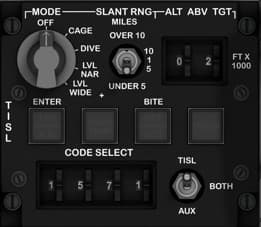
Location Front lower center console — positioned between the pilot’s knees, directly above the Breakout/Environmental panel and below the main instrument cluster. Purpose Controls the AN/AAS-35(V) Pave Penny laser spot tracker, which detects reflected laser energy from ground-designated targets. It allows the pilot to set laser codes, select modes, and monitor system status. Controls & Indicators MODE Selector Knob 5-position rotary switch: OFF – Power off. CAGE – Stabilizes TISL gimbal for ground alignment. DIVE – Sets scan geometry for dive deliveries. LVL NAR – Level flight, narrow field of view. LVL WIDE – Level flight, wide field of view. SLANT RNG (Range Selector) Rotary knob selects range scale for target distance display: OVER 10 miles 10 / 5 / 1 / UNDER 5 miles ALT ABOVE TARGET Indicator Mechanical or digital counter (in hundreds of feet). Displays altitude difference between aircraft and tracked target. CODE SELECT Wheels (4-digit) Rotary selectors for laser spot code (1000–1788 range). Defines which laser-coded spot the sensor will detect. Includes ENTER push button to confirm code input. TISL AUX Switch 3-position toggle switch: AUX – Uses auxiliary input from backup system. BOTH – Dual redundancy (main and aux). OFF – Deactivates system power. BITE (Built-In Test Equipment) Button Activates internal self-test sequence. Adjacent annunciators indicate system health: OVER TEMP (amber) DET ACD (Detector Active) TRACK (Target lock indicator) Recommended Hardware (Simpit Build) 1 × 5-position rotary switch (MODE). 1 × 5-position rotary switch (RANGE). 1 × 3-position toggle switch (TISL AUX). 1 × push button (ENTER). 1 × push button (BITE). 4 × rotary wheels or rotary encoders (CODE SELECT). 3 × LED indicators (OVER TEMP, DET, TRACK). Construction Panel material: 3 mm matte black acrylic with white laser engraving. Knobs: Military-style with white markings. Lighting: Soft green backlight for night operations. Optional: Use 7-segment LED or mechanical counter for ALT indicator simulation. DCS-BIOS Bindings TISL_MODE_SW TISL_RANGE_SEL TISL_ALT_DISPLAY TISL_CODE_DIGIT_[1–4] TISL_ENTER_BTN TISL_BITE_BTN TISL_AUX_SW TISL_STATUS_[OVERTEMP/DET/TRACK] Real Aircraft Operation The TISL system was designed to passively detect laser reflections from ground designators, aiding target identification without emitting radiation. Normal use procedure: Power system to LVL NAR or LVL WIDE. Input correct laser code via CODE SELECT. Press ENTER. Observe TRACK light when a valid laser spot is detected. Use altitude indication and slant range for targeting confirmation. Note: In the A-10C II, the TISL is typically disabled, as modern targeting pods (e.g., Litening, Sniper) have replaced its function.
Latest Updates


Project Update — Rethinking Panel Design for Everyone
I paused development of the A-10C panels for a moment to focus more deeply on the electronics side of SIMSTRUCT. After all… what is a body without a soul? The front console is essentially complete — all panels are designed, printed, tested, and the fit is extremely accurate. I’m very happy with how the results are shaping up. However, with the arrival of a new batch of toggle switches, it became clear that I’ll need to revisit some parts of the design, especially the mounting geometry on the back panels. This raised an important question about the future direction of SIMSTRUCT: How can I make the A-10C cockpit files and electronics accessible to everyone, regardless of skill level or component availability? Different builders use different hardware, and even small variations in switch dimensions can become barriers to an otherwise simple build. That goes against my vision — which is to make cockpit construction achievable and enjoyable for all. Because of this, I’m now exploring a “one-size-fits-all” approach for panel design. The idea is to create mounting systems and tolerances flexible enough to support a wide range of switches and components without forcing anyone to hunt for specific hardware. And I would love to hear from the community: What challenges have you faced with panel compatibility? What ideas or suggestions do you have for universal mounting systems? Are there components you think should be prioritized for broad compatibility? Thank you all for following the project and supporting each step of this journey. Much more is coming soon — and your feedback will shape it. See you in the next update.

SIMSTRUCT – Front Console Input Board Update!
(A small pause… but for a very good reason!) Hey everyone! I took a short break from modeling the A-10C panels because I needed to lock down something even more important: the electronics heart that will power the entire front dashboard. Sometimes you have to pause the build to keep the ideas fresh — and trust me, this part was worth the pause. Today I’m sharing a sneak peek of the Front Console Input Board, the “brain” that will handle all the switches, toggles, encoders and sensors from the A-10C front panel. No more cable chaos. No more guessing pins. No more fragile protoboards. Just plug, fly, and smile. 😄 What’s working right now Fully integrated ATmega32U4 (native USB) High-density input matrix with 20 shift registers (160+ digital inputs!) Four 50-pin IDC ports for clean, organized panel wiring Built-in filtering, decoupling, and DCS-ready structure Designed from scratch specifically for the A-10C front console And best of all: It will ship with firmware pre-flashed, DCS-BIOS profiles, naming conventions, and calibration already aligned with the A-10C cockpit logic. You plug it in, connect your switches, and your sim suddenly feels alive. Next milestone I’m now beginning development of the output slave board — the board that will handle backlighting, annunciators, caution lights, and other outputs. Once both boards are complete, the entire front console becomes one clean, integrated ecosystem. What’s coming If all goes well, the full A-10C front console set (inputs + outputs + panel files + wiring guides) should be ready for testing in about one month. ✈️ And beyond… A-10C was my first love, so she had to come first But after she’s complete, I’ll be releasing plane-specific electronics for multiple aircraft. Why plane-specific? Because every aircraft deserves its own optimized, precise electronics. No improvisation. No wrestling cables. No guessing pins. Just: ✔️ Plug in your console ✔️ Load your profile ✔️ And fly. Community Support Coming Soon Over the next 2 weeks, I’ll be launching: A Patreon with supporter tiers (behind-the-scenes progress, early access files, exclusive perks) The official SIMSTRUCT website, where you can follow development and access resources, files, instructions, tutorials and more. And in about 3 weeks, I’ll open the Interest List + Pre-Order Pipeline for those who want to secure their spot for the first production run. Your feedback and support mean the world to me — and they help push this project forward faster. I will keep posting Hope you enjoy the preview! Let me know what you think!

Fusion 360 Design
The design of the entire Front Console was made modular following a calibrated photo of the cockpit. A real world dimension was obtained form one panel and applied to the photo, so by proportion all the panels aligned and became at scale with the real console. The design had to take in consideration that an LCD panel will be placed in the back to provide instrument readings via Helios, so the panel could not pass that plane. This obliged me to go slightly away from the real proportion and add some additional depth to it. ( Which it turns out looked good in my opinion and made it bulkier) To facilitate with the electronic assembly, I decided to make it in 4 layers. The first layer was the frame that attaches to the console build structure and to the back panel of the AHCP. The back panel is a 5 mm part that will house the toggle switches. Many trial and errors had to be done in order to find the appropriate tolerances to properly fit the switches in the slots. The next layer comprises of a faceplate that will house the backlighting. I made small 3 mm holes ( With appropriate tolerance) to fit in the LEDs that will shine on the next layer plate. The fourth and last layer is the acrylic decal plate where the labels are engraved (see the fab/laser section for more detail)
Support This Build
Become a member to access exclusive content and full project downloads.
Join as Supporter