Fairchild Republic A-10 Thunderbolt II
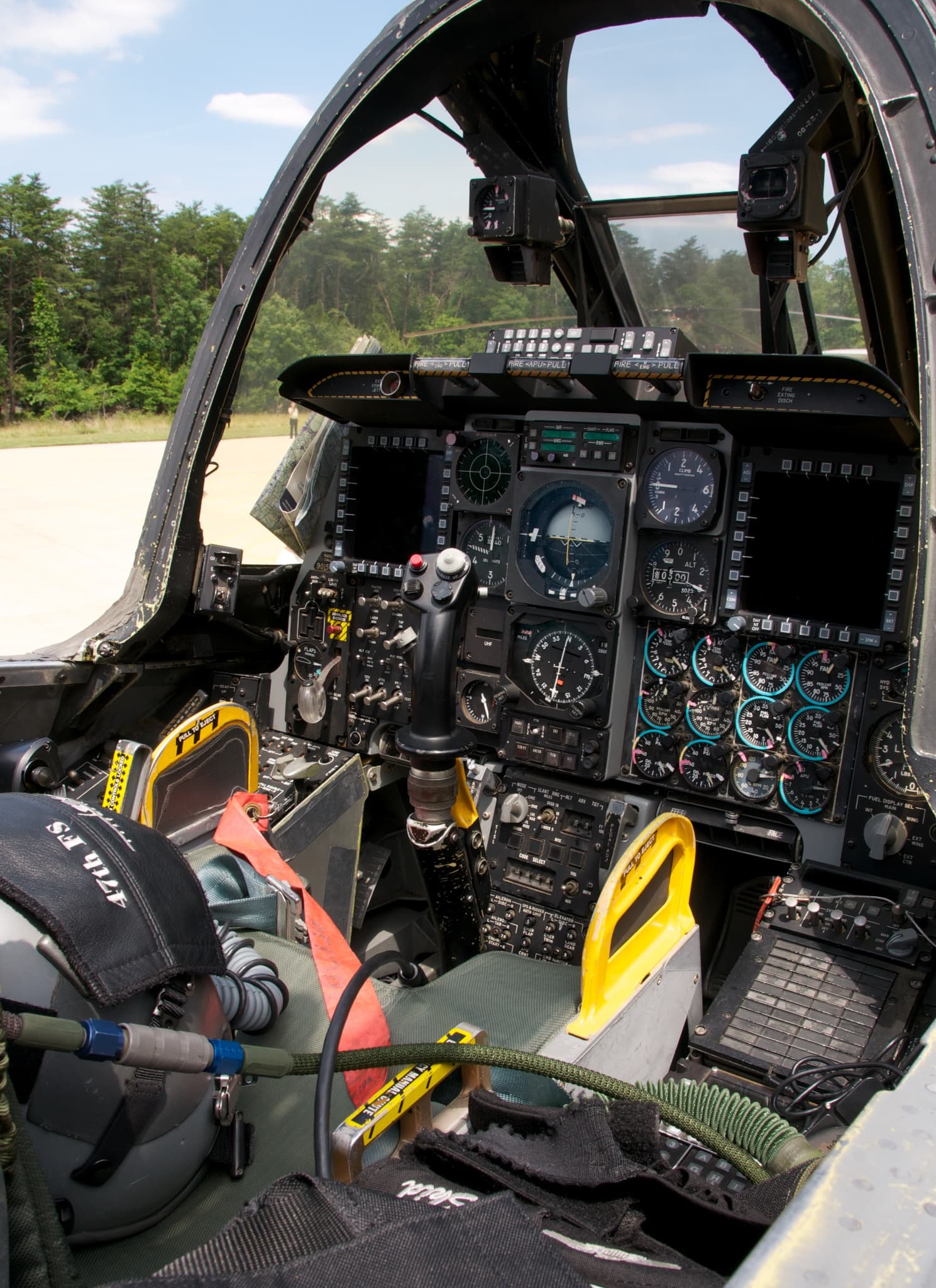
The Fairchild Republic A-10 Thunderbolt II, also widely known by the nickname A-10 Warthog, is a single-seat, twin-turbofan, straight-wing, subsonic attack aircraft developed by Fairchild Republic for the United States Air Force (USAF). In service since 1977, it is named after the Republic P-47 Thunderbolt strike-fighter of World War II, but is instead commonly referred to as the "Warthog" (sometimes simply "Hog").[3] The A-10 was designed to provide close air support (CAS) to ground troops by attacking enemy armored vehicles, tanks, and other ground forces; it is the only production-built aircraft designed solely for CAS to have served with the U.S. Air Force.[4] Its secondary mission is to direct other aircraft in attacks on ground targets, a role called forward air controller (FAC)-airborne; aircraft used primarily in this role are designated OA-10.
Overall Progress
32%Featured Panels
Panels

A General Front Console Hardwares
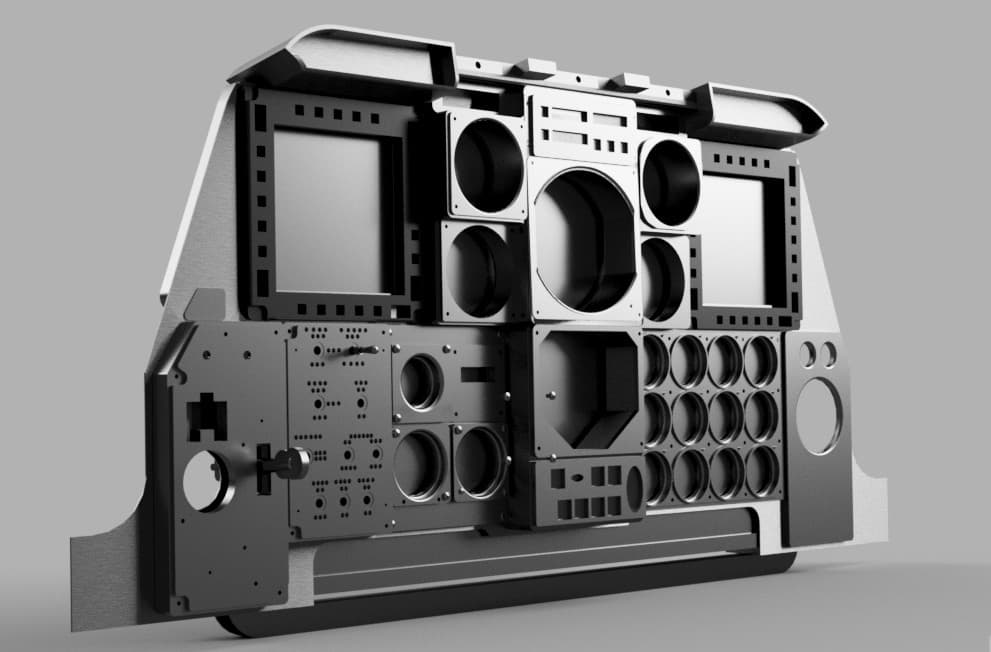
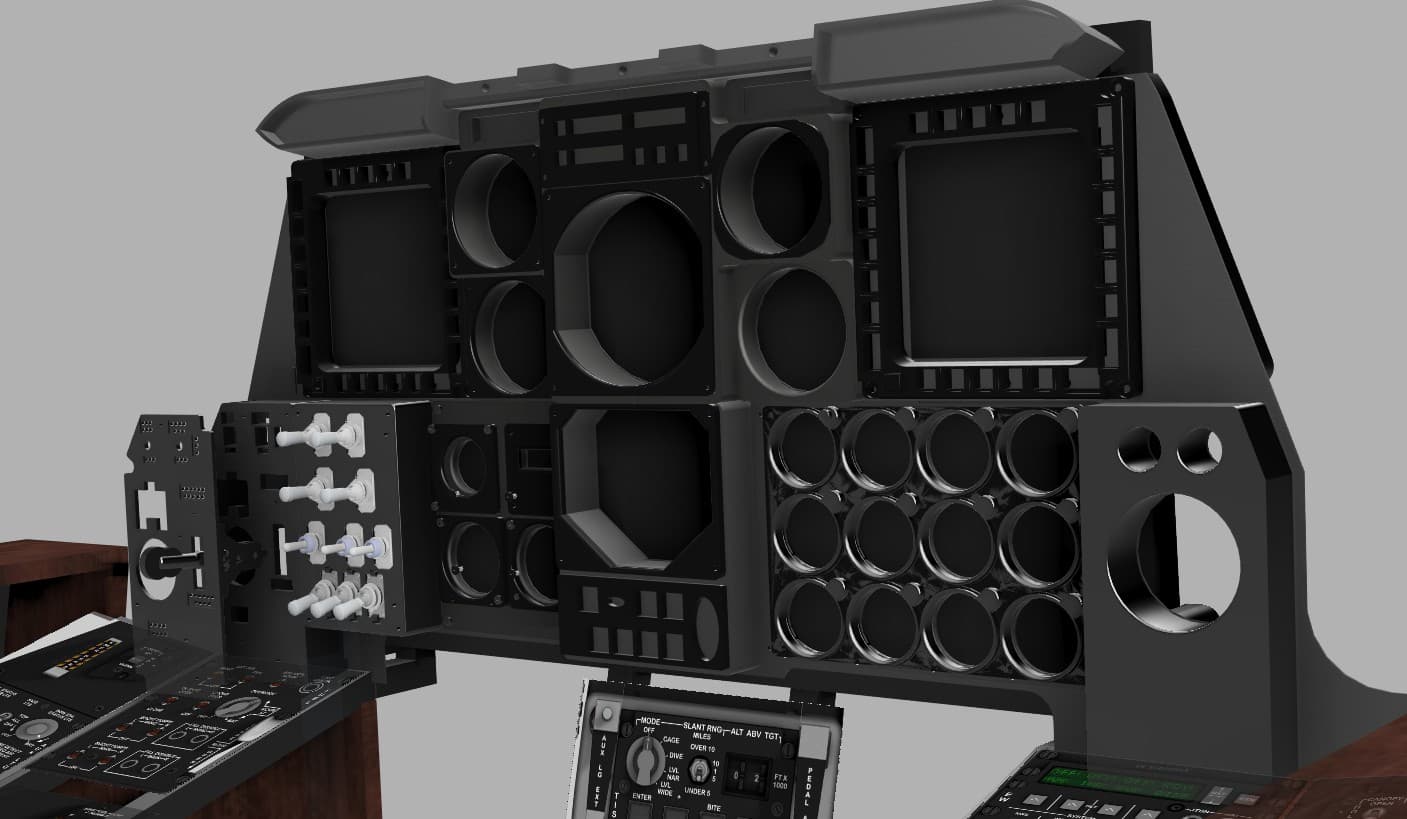
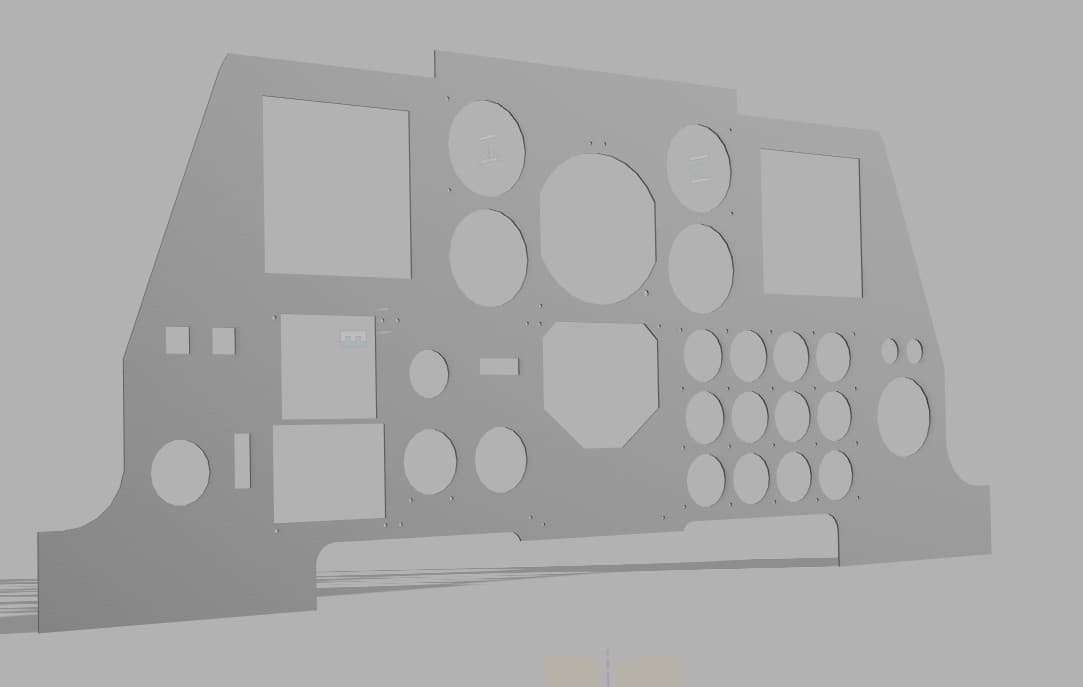
The panels are designed and built modular and 3D printed. The objective was to build something large in a small 3D printer. Thus I decided to design all panels separately and to fuse them together after fabrication. A flat and smooth back surface was required in order to accommodate an LCD panel for the instrument readings. So, in order to keep the proper real life proportions, I was limited to building each layer and fit all electronics in a very narrow space. I designed a back panel that could be laser cut in aluminum or other material, but this would raise the cost. So I opted for sectioning the entire structure into pieces that would fit the 3D printer build plate. These parts will then be merged with epoxy resin, and the individual panels bolted to its front surface. This would be solid and strong enough for the purpose and a decision was made to keep this solution on this initial version.

AHCP Panel
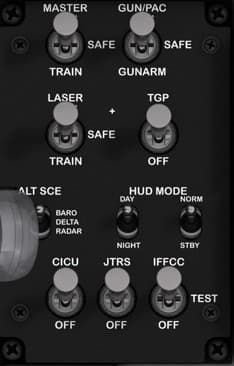
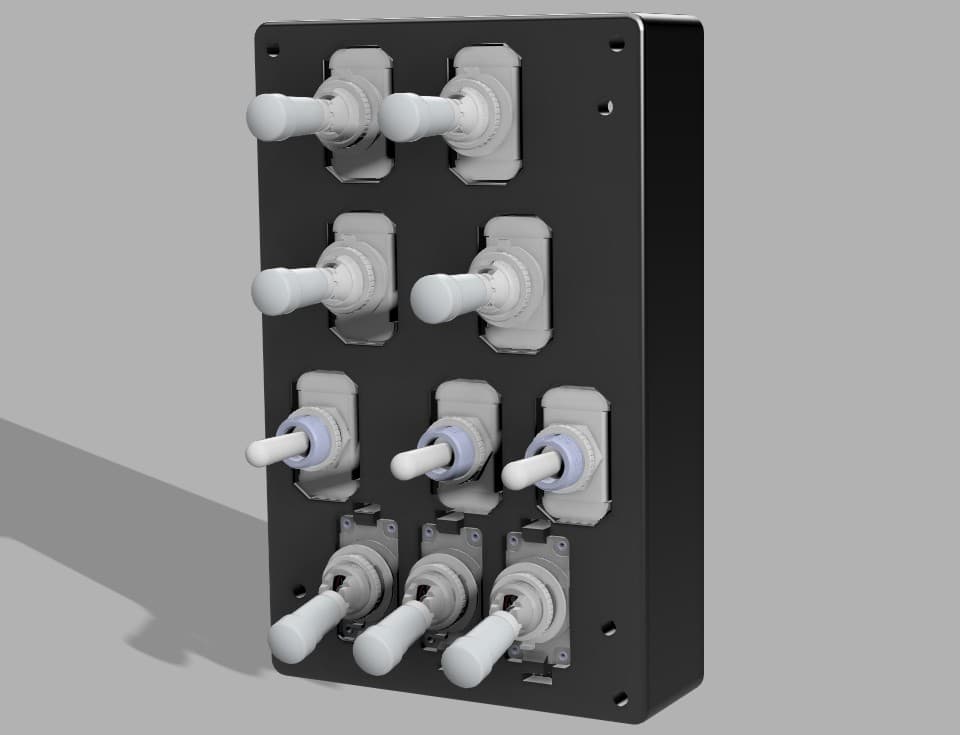
Function Description: The Armament and Control Panel governs the A-10C’s weapon system arming, targeting, and avionics control logic. It enables or disables subsystems like the GUN/PAC, TGP (Targeting Pod), and IFFCC (Integrated Flight & Fire Control Computer). It also sets HUD display modes and altitude source configuration. This panel is essential for switching between training, safe, and combat states and coordinating the aircraft’s fire-control systems. Control Elements and Functions MASTER ARM Switch Positions: TRAIN / SAFE / ARM Function: TRAIN: Enables weapon system simulation only (no actual weapon release). SAFE: Disables all weapon firing. ARM: Enables live weapon release. Type: 3-position fixed toggle (ON–OFF–ON). GUN/PAC Switch Positions: SAFE / GUNARM Function: SAFE: Disables gun and PAC (Precision Attitude Control). GUNARM: Activates gun firing and PAC stabilization mode. Type: 2-position fixed toggle (ON–ON). LASER Switch Positions: TRAIN / SAFE Function: Controls the laser firing circuit for the TGP (Targeting Pod). TRAIN: Simulated laser firing (no emission). SAFE: Laser disabled. Type: 2-position fixed toggle (ON–ON). TGP Switch Positions: OFF / ON Function: Powers the Targeting Pod for laser and targeting functions. Type: 2-position fixed toggle (ON–ON). ALT SCE Switch Positions: BARO / DELTA / RADAR Function: Selects altitude source for the HUD and targeting systems: BARO: Uses barometric altitude. DELTA: Uses offset reference. RADAR: Uses radar altimeter data. Type: 3-position fixed toggle (ON–OFF–ON). HUD MODE Switch Positions: DAY / NIGHT / STBY Function: DAY: Bright display for daylight operation. NIGHT: Dimmed HUD for night missions. STBY: Turns off the HUD. Type: 3-position fixed toggle (ON–OFF–ON). CICU Switch Positions: OFF / ON Function: Powers the Central Interface Control Unit, managing data flow between avionics and weapons systems. Type: 2-position fixed toggle (ON–ON). JTRS Switch Positions: OFF / ON Function: Controls Joint Tactical Radio System power. Type: 2-position fixed toggle (ON–ON). IFFCC Switch Positions: OFF / TEST / ON Function: OFF: Disables the fire control computer. TEST: Enters diagnostic mode. ON: Normal operation. Type: 3-position fixed toggle (ON–OFF–ON).

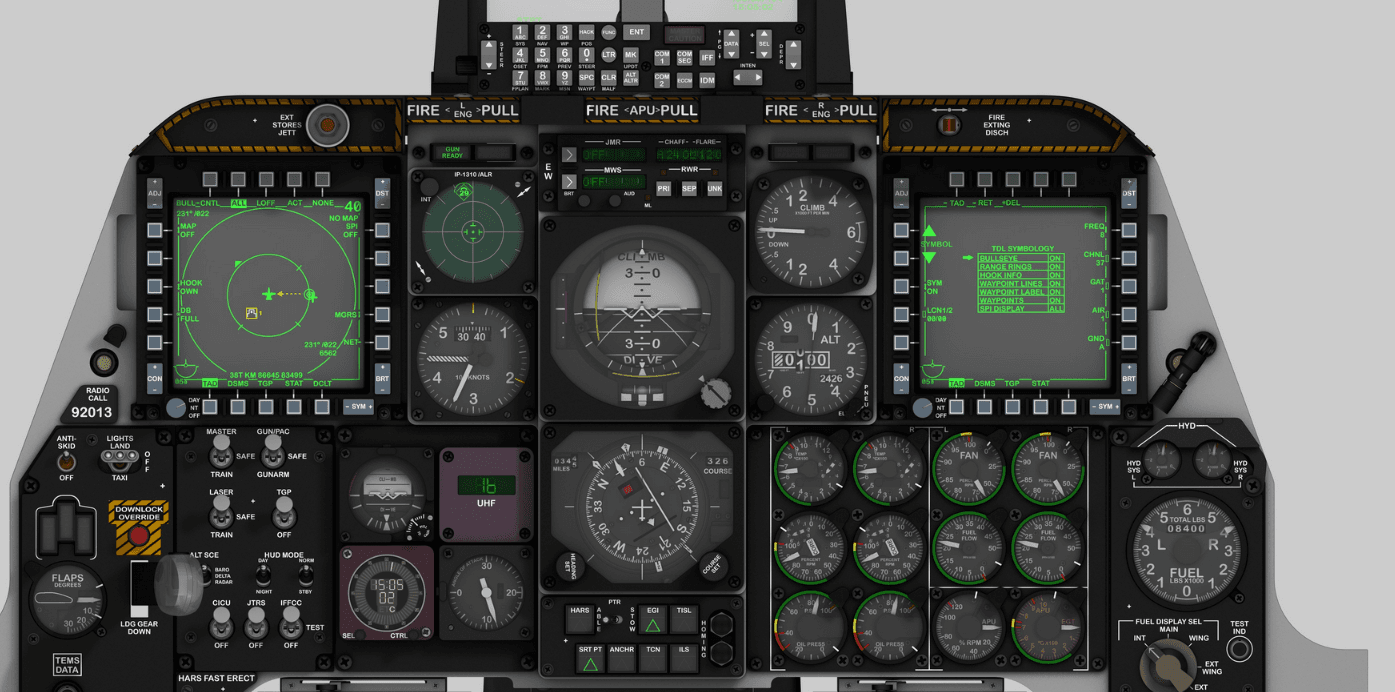
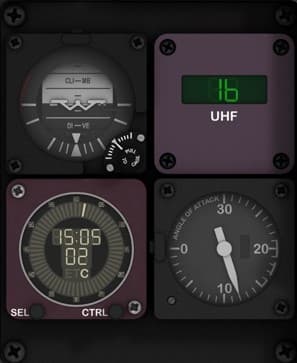
Auxiliary Flight Instruments Cluster
Function Description: This section of the A-10C main instrument panel houses a group of four essential analog and digital instruments providing backup and reference data for flight attitude, communications, and flight performance. It allows the pilot to maintain key situational awareness parameters in the event of primary display failure or during routine flight checks. Control Elements (Top Left – Bottom Right): Standby Attitude Indicator (SAI) Function: Displays aircraft pitch and roll relative to the horizon, independent of the main flight computer. Type: Gyroscopic instrument. Controls: • Pull-to-cage knob (momentary, mechanical). • Adjustment knob (rotary potentiometer). UHF Frequency Display (UHF Control Repeater) Function: Displays the currently selected frequency of the UHF radio system. Type: Digital display, receives input from UHF radio control panel. Controls: None on this panel (read-only repeater). Digital Clock / Elapsed Time Counter (ETC) Function: Provides UTC time, local time, and stopwatch functionality. Controls: • SEL (Select) button – momentary pushbutton. • CTRL (Control) button – momentary pushbutton. Type: Digital display with two tactile switches. Angle of Attack (AOA) Indicator Function: Indicates the current angle of attack (α) — the angle between the wing chord line and relative airflow, crucial for stall prevention and precise approach control. Type: Analog gauge (servo-driven in the real aircraft). Controls: None. Suggested Hardware Components: Standby Attitude Indicator: simulated via LCD or servo-driven artificial horizon module (e.g. 2-axis servo gimbal). UHF Display: 7-segment LED module or small OLED for frequency repeater. Clock (ETC): small digital display module with two tactile pushbuttons. AOA Indicator: analog servo or stepper gauge (SG90 micro servo or X27.168 automotive stepper). Buttons: 2x momentary pushbuttons (SEL and CTRL). Notes for Labeling and Backlighting: Backlight color: green or warm white for analog gauges; dimmable LED for digital modules. Engrave legends “SEL” and “CTRL” on the lower digital clock panel. Ensure uniform diffusion for the digital modules using a thin (0.5–1mm) frosted acrylic overlay. Recommended material: • 3mm black-painted clear acrylic front (laser engraved labels). • 5mm mid-layer for component seating and LEDs.

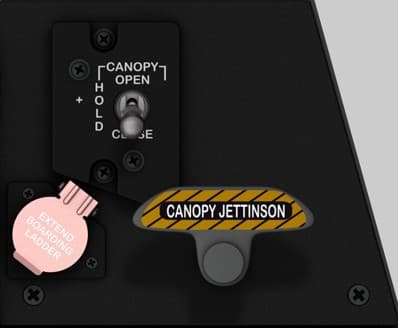
Canopy Control & Boarding Ladder Panel
Location Upper-right section of the right console, adjacent to the Countermeasure Set Control Panel (CMSP). Purpose Provides mechanical and electrical control of the canopy and pilot boarding ladder, as well as the emergency canopy jettison system. This panel allows normal canopy operation during ground and flight operations, and emergency egress capability in case of damage or power failure. Controls CANOPY OPEN / HOLD / CLOSE Switch — Three-position spring-loaded toggle controlling canopy motor: OPEN: Electrically opens the canopy. HOLD: Stops canopy motion (neutral position). CLOSE: Electrically closes the canopy. Uses a motorized actuator and limit switches for full-range movement. EXTEND BOARDING LADDER Switch (with safety guard) — Two-position switch protected by a pink safety cover: EXTEND: Deploys the boarding ladder (hydraulic assist). RETRACT: Ladder stows back into the fuselage when cover is closed. Safety cover must be lifted to operate. CANOPY JETTISON Handle — Mechanical emergency release handle with yellow/black hazard markings: Pulling handle releases canopy latches via explosive charges or mechanical cable. Used for emergency egress if the electrical canopy control system fails. Recommended hardware (simpit) 1 × 3-position (ON–OFF–ON) toggle switch for canopy control. 1 × guarded 2-position toggle switch for boarding ladder (red or pink cover). 1 × large 3D-printed jettison handle (spring-loaded, momentary type) with safety detent if possible. Optional: motorized canopy actuator simulation using servo or linear actuator for realistic feedback. Construction 3 mm black matte acrylic faceplate, engraved white labels with yellow/black hazard stripe for jettison handle. Boarding ladder guard modeled with separate color overlay for realism. Mount depth: ~25 mm minimum to accommodate wiring and jettison handle movement. Lighting No internal illumination. Relies on indirect cockpit flood lighting. Notes (DCS-BIOS) Fully functional in DCS A-10C. Bindings include: CANOPY_SW (three-position toggle) BOARDING_LADDER_SW (guarded toggle) CANOPY_JETT_HANDLE (momentary jettison) For realism, users can link CANOPY_SW to servo-actuated canopy models or linear motion systems.

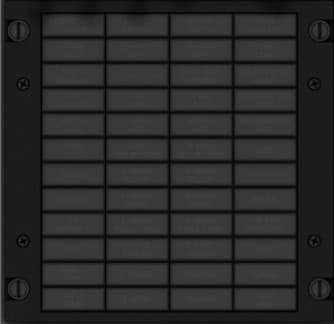
Caution Light Panel (CLP)
Location Upper-right section of the right console, directly below the Countermeasure Set Control Panel (CMSP) and beside the Canopy Control Panel. Purpose Provides visual alerts and system status warnings to the pilot for critical aircraft subsystems. Each annunciator light indicates a malfunction or system condition requiring attention. Lights are amber when illuminated, signaling either a fault, configuration warning, or system disablement. Controls Individual Caution Lights (30 total): Each light corresponds to a monitored aircraft subsystem (see label list below). Test Function: All caution lights illuminate during the cockpit “Lamps Test” to verify bulb integrity. Recommended hardware (simpit) 30 × 5 mm amber LEDs or 3 mm SMD LEDs behind a translucent light diffuser. Each LED individually wired to an Arduino or shift register via DCS-BIOS for accurate light mapping. Optional laser-engraved acrylic light plate, dual-layer (black top / translucent amber base). Construction Two-layer panel recommended: Top layer: 3 mm matte black acrylic with engraved legends. Bottom layer: 2 mm frosted or translucent amber acrylic diffuser. Engraving depth ~0.2 mm for uniform light bleed. Individual 10 × 10 mm square cutouts (approx.) for LEDs. Lighting Amber LED illumination for active cautions. Optional white backlight for standby readability. Notes (DCS-BIOS) All lights mapped in DCS-BIOS under CAUTION_LIGHT_PANEL. Typical syntax: DcsBios::LED cautionLightHydL(0xXXXX, 0x01); Each LED index corresponds to a light name in the A-10C export list. A-10C Caution Light Panel — Label Matrix Row A B C D 1 ENG START CYCLE L-HYD PRESS R-HYD PRESS GUN UNSAFE 2 ANTI-SKID L-HYD RES R-HYD RES OXY LOW 3 ELEV DISENG L-AIL TAB R-AIL TAB SEAT NOT ARMED 4 AIL DISENG L-ENG HOT R-ENG HOT BLEED AIR LEAK 5 PITCH SAS L-ENG OIL PRESS R-ENG OIL PRESS SERVICE AIR HOT 6 YAW SAS L-MAIN PUMP R-MAIN PUMP WINDSHIELD HOT 7 GCAS L-WING PUMP R-WING PUMP CICU 8 LASTE L-MAIN FUEL LOW R-MAIN FUEL LOW HARS 9 IFF MODE 4 L-FUEL PRESS R-FUEL PRESS L-R TKS UNEQUAL 10 EAC L-CONV R-CONV NAV 11 STALL SYS L-GEN R-GEN CADC 12 APU GEN — — INST INV

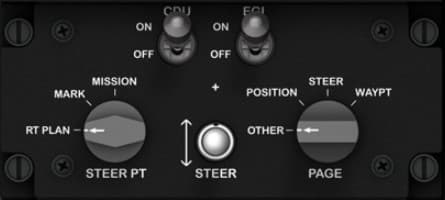
CDU & EGI Power and Navigation Control Panel
Location Right console, mid-lower section — situated below the CDU keypad and adjacent to the Environmental Control panel. Purpose Controls power supply to the CDU (Control Display Unit) and EGI (Embedded GPS/INS), and allows pilot input for navigation mode selection and steerpoint/page management. This panel is critical for flight navigation initialization and waypoint management. Controls Power Section CDU Power Switch (ON/OFF) Activates power to the Control Display Unit. When ON, enables CDU screen and interface for mission data management. EGI Power Switch (ON/OFF) Powers the Embedded GPS/INS (primary navigation system). EGI integrates GPS with inertial reference data to provide position and attitude information to onboard systems. Navigation Section STEER PT Knob (Rotary Selector) RT PLAN – Route plan editing or selection. MARK – Selects markpoints created in-flight. MISSION – Activates mission flight plan points. PAGE Knob (Rotary Selector) POSITION – Displays current aircraft position. STEER – Focuses on current steering waypoint. WAYPT – Allows waypoint review or editing. OTHER – Access to miscellaneous navigation pages. STEER Button (Momentary Push) Cycles through steerpoints or confirms selection. Recommended Hardware (simpit build) 2 × Toggle switches (ON/OFF) for CDU and EGI power. 2 × Rotary switches (3–4 positions) for STEER PT and PAGE selection (3P4T rotary or mechanical encoder if interfaced via Arduino). 1 × Momentary push button for STEER function. Optional: Add LED indicators for CDU and EGI power states. Construction Panel material: 3 mm matte black acrylic, white engraved text. Knobs: Standard 18–20 mm diameter rotaries (can reuse same profile as other A-10C knobs). Mounting depth: 20 mm minimum behind faceplate for rotary clearance. Backlighting: Optional edge-lit green LEDs or diffuse panel backlight. DCS-BIOS Bindings CDU_POWER_SW EGI_POWER_SW STEER_PT_KNOB PAGE_KNOB STEER_BUTTON Real Aircraft Notes The CDU/EGI system initializes the A-10C’s navigation and targeting database. During startup, the pilot powers both systems, aligns the EGI, and uses the CDU panel to confirm INS alignment before flight.

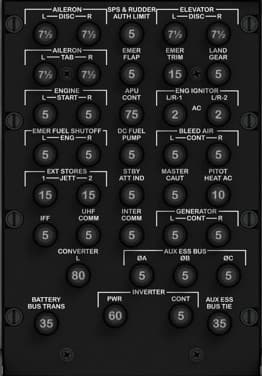
Circuit Breaker (CB) Panel — Left Front Console (Breaker Out Panel)
Location Front lower console, directly below the TISL panel, positioned between the pilot’s knees. This panel forms the bottom section of the front console. Purpose Provides electrical protection and circuit isolation for essential aircraft systems. Each breaker corresponds to a specific subsystem (flight controls, hydraulics, communications, lights, generators, etc.), allowing manual reset or disconnection in case of overloads or electrical faults. Layout Overview The A-10C’s breaker panel is divided into functional groups — each row protecting a major aircraft system. Below is the typical layout and function by row and label, matching the real aircraft: Row Left Center Left Center Right Right 1 AILERON DISC R SPS & RUDDER AUTH LIM ELEVATOR DISC R LAND GEAR 2 AILERON TAB R EMER FLAP EMER TRIM LAND GEAR L & R 3 ENGINE START APU CONT FUEL PUMP BLEED AIR 4 EMER FUEL SHUTOFF ENG DC FUEL PUMP MASTER CAUT PITOT HEAT AC 5 EXT STORES JETT STBY ATT IND IFF UHF COMM 6 INTER COMM GENERATOR CONT CONVERTER 7 BATTERY BUS TRANS PWR INVERTER AUX ESS BUS AUX ESS BUS TIE

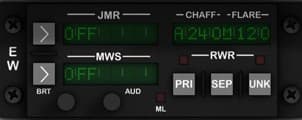
CMSC Control Panel AN/ALQ-213
Function Description: This panel controls the A-10C’s self-protection and threat-avoidance systems. It manages the aircraft’s Electronic Warfare Suite, including radar warning (RWR), missile warning (MWS), jammer control (JMR), and chaff/flare countermeasure programs. It allows the pilot to monitor, activate, and configure automatic or manual countermeasure modes to defend against radar-guided and infrared threats. Control Elements: JMR (Jammer) Display and Controls • Function: Controls and displays jammer status (ON/OFF, mode, and fault). • Controls: – Left arrow button: momentary pushbutton (mode select or toggle). – Right arrow button: momentary pushbutton (confirmation or submenu select). – BRT knob: rotary potentiometer for display brightness. MWS (Missile Warning System) Display and Controls • Function: Monitors infrared/UV missile warning sensors and displays system state. • Controls: – Left arrow button: momentary pushbutton. – Right arrow button: momentary pushbutton. – AUD knob: rotary potentiometer for system audio volume. RWR (Radar Warning Receiver) Section • Function: Controls radar threat detection display and chaff/flare program selection. • Controls: – Three rectangular momentary pushbuttons labeled PRI, SEP, and UNK (Primary, Separate, and Unknown signal filter modes). – Two small status LEDs (above the buttons). Chaff/Flare Counter Display • Function: Indicates current chaff/flare loadout and dispensing program (e.g., A240/M120). • Type: Green alphanumeric LED or OLED display (read-only). Side Selector (E–W) • Function: Electronic Warfare Power switch – toggles ECM master control. • Type: 3-position fixed toggle (E – center – W). ML (Mode Lamp) • Function: Status indicator lamp. • Type: 3 mm green LED (ON when countermeasure program active). Suggested Hardware Components: 7× momentary pushbuttons (for arrows and RWR modes). 2× rotary potentiometers (10 kΩ linear) for brightness and volume. 1× 3-position toggle switch (ON–OFF–ON type). 3× LED displays or OLED screens for JMR, MWS, and Chaff/Flare indicators. 2× 3 mm LEDs for status indicators. Notes for Labeling and Backlighting: Backlight color: green (to match A-10C avionics illumination). Font: Eurostile or Futura-type, all caps, white engraving. Panel layout: 3 mm top acrylic (engraved, black-painted), 5 mm mid-layer for buttons/LEDs, and 1.5 mm rear spacer for wiring. Ensure LED diffusion across each display aperture using thin frosted film.

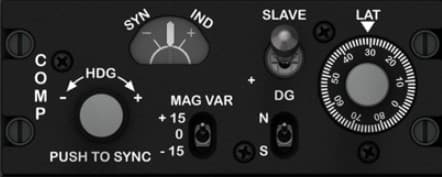
COMPASS / MAG VAR / LAT Control Panel
Location Right console, lower front section — positioned adjacent to the ILS and Lighting Control Panels. Purpose Provides manual and automatic control of the aircraft’s magnetic heading reference system, which synchronizes the Directional Gyro (DG) and Magnetic Slaving Unit (MSU). It allows correction of magnetic variation, adjustment of latitude compensation, and synchronization of heading data displayed on the HSI and other navigation instruments. Controls HDG (Heading Knob) Rotary control: Adjusts the slaved gyro heading reference. Label: “HDG ±” with PUSH TO SYNC function. Push action: Instantly synchronizes the DG with the magnetic sensor (for calibration or manual correction). SYN/IND Indicator Dual-needle display showing the synchronization status between the Directional Gyro and Magnetic Compass. Centered needles: System aligned. Deviation: Indicates slaving error. MAG VAR (Magnetic Variation) Selector 3-position toggle switch: +15, 0, –15 — adjusts system correction for local magnetic declination relative to true north. SLAVE / DG Selector 2-position toggle switch: SLAVE — automatic synchronization between DG and magnetic compass. DG — manual mode for free directional gyro operation. LAT (Latitude) Adjustment Knob Large rotary dial marked in degrees (0–90). Adjusts latitude compensation for the earth’s magnetic dip effect on gyro precession. N / S Selector 2-position toggle switch: Selects hemisphere for magnetic correction (N for northern, S for southern hemisphere). Recommended Hardware (simpit build) 1 × Rotary encoder with push (for HDG + push-to-sync). 1 × Dual analog indicator (or simulated on OLED) for SYN/IND gauge. 3 × Mini toggle switches: MAG VAR, SLAVE/DG, N/S. 1 × Large rotary potentiometer or encoder (for LAT adjustment). Construction Panel material: 3 mm black acrylic with engraved white labeling. Knobs: HDG and LAT: 25 mm diameter with marked index. Switches: mini toggles with silver bat handles. Backlighting: Soft green edge or indirect LED illumination. DCS-BIOS Bindings COMP_HDG_ADJ COMP_SYNC_BTN COMP_SLAVE_DG_SW COMP_MAGVAR_SW COMP_LAT_ADJ COMP_NS_SW Real Aircraft Operation This system ensures accurate heading display by maintaining alignment between the Directional Gyro (DG) and magnetic compass. In SLAVE mode, synchronization is automatic; DG mode allows manual operation in case of slaving unit malfunction or heavy magnetic interference. Typical Procedure: Verify SLAVE mode for normal operation. Adjust MAG VAR and LAT for current geographic region. Use PUSH TO SYNC if compass/gyro drift becomes apparent.

Control Display Unit (CDU)
Location Right console, mid-upper section — positioned below the Electrical Power Control Panel and beside the Oxygen Regulator Panel. Purpose Serves as the primary flight management and navigation interface for the A-10C. The CDU provides full control of the aircraft’s navigation computer, flight plan management, GPS/INS system, and mission data input. It allows the pilot to view, enter, and modify waypoints, routes, coordinates, and system status. Controls Alphanumeric Keypad (A–Z, 0–9) — Used to enter coordinates, waypoints, identifiers, and mission data. Function Keys (SYS, NAV, WP, OSET, FPM, PREV, NEXT) — Navigate CDU pages and access system menus. Data Keys (L1–L6, R1–R6) — Soft keys aligned to on-screen options; correspond to data on the left and right sides of the display. Brightness Controls (DIM / BRT) — Adjust screen backlight intensity. Special Keys: MK: Mark current aircraft position as a waypoint. BCK / CLR: Delete or backspace entries. SPC: Space input. +/–: Toggle data values or scroll lists. Display Monochrome green screen displaying alphanumeric mission and navigation data. Data fields dynamically update from the Embedded GPS/INS (EGI) and Mission Computer. Dimensions: approx. 3.5" active area. Recommended hardware (simpit) Display: 3.5–4.0" LCD screen (800×480) driven by Raspberry Pi or HDMI micro-display. Buttons: 55 tactile switches or 3D-printed keycaps on a custom PCB. Optional: Arduino Mega or dedicated input controller for matrix scanning. Backlighting: Uniform green LED backlight or electroluminescent sheet for authenticity. Construction Panel layers: Top: 3 mm matte black acrylic, laser-engraved. Mid: PCB or button carrier plate. Bottom: Diffuser and light guide sheet. Font: MIL-SPEC Futura Medium Condensed or Eurostile. Display window: Clear acrylic with anti-glare film. Notes (DCS-BIOS) The CDU is one of the most advanced interactive panels in DCS-BIOS: Exposes data for every screen line and button. Uses high-frequency communication (multi-word values). Example binding: DcsBios::Switch2Pos cduNavBtn("CDU_NAV_BTN", PIN); DcsBios::LCDDisplay cduLine1(0x1234, 16); In-Sim Functionality The CDU works in tandem with the Up-Front Controller (UFC) and EGI (Embedded GPS/INS). It is essential for: Flight planning and waypoint management GPS/INS alignment System tests (BIT) Communication with onboard avionics and the Mission Computer

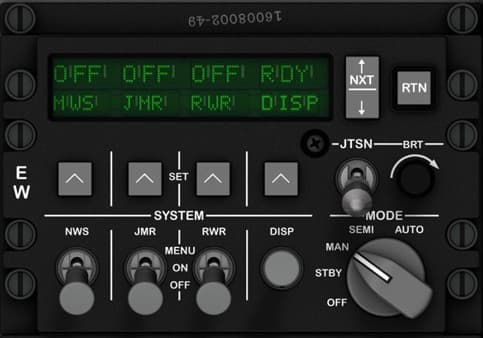
Countermeasure Set Control Panel (CMSP)
Location Top section of the right console, immediately forward of the Canopy Jettison Handle. Purpose Manages the A-10C’s electronic warfare and countermeasure systems, including the AN/ALE-47 dispenser (chaff/flare), AN/ALR-69 Radar Warning Receiver (RWR), AN/ALQ-131/184 jammer pod, and AN/AAR-47 Missile Warning System (MWS). The panel controls system mode, power, and program selection for automatic or semi-automatic threat defense. Controls DISPLAY Screen — Green alphanumeric LED showing system status for: MWS (Missile Warning System) JMR (Jammer) RWR (Radar Warning Receiver) DISP (Countermeasure Dispenser) MODE Knob (OFF / STBY / MAN / SEMI / AUTO) — Sets operating mode: OFF: System powered down. STBY: Warm-up and self-test active. MAN: Manual dispensing only. SEMI: Pilot consent required for automatic dispense. AUTO: Fully automatic threat detection and response. JTSN Knob (BRIGHTNESS) — Adjusts display brightness for visibility under varying cockpit lighting. SYSTEM Switches: NWS (Naval Warning System) — Enables power to the threat detection subsystems. JMR (Jammer) — Controls the ALQ pod’s power and activation. RWR (Radar Warning Receiver) — Activates radar threat detection. DISP (Dispenser) — Arms the ALE-47 countermeasure system for chaff/flare deployment. MENU / ON / OFF Toggle — Accesses setup menu for system programming and BIT (Built-In Test). Four Arrow Keys (▲ ◄ SET ► ▼) — Used for navigating and setting up programs, threat categories, or dispense sequences via the CMSP display. NXT / RTN Buttons — Used for navigating between system pages and returning to the main status screen. Recommended hardware (simpit) 6 × ON-OFF or ON-ON toggle switches (with black caps for authenticity). 1 × 5-position rotary switch (for mode selection). 4 × tactile push buttons (for arrow keys). 2 × small tactile push buttons (for NXT and RTN). Optional small OLED or 16×2 LCD to simulate the CMSP display. Construction 3 mm black matte acrylic faceplate, white engraved legends, green translucent screen window. Mount compatible with backlighting; cutout for display optional for advanced builds. Recommended mounting depth: 25–30 mm to accommodate toggle clearance. Lighting Green backlighting through engraved labels and display window. Can simulate standby glow using low-brightness LEDs behind display glass. Notes (DCS-BIOS) Fully functional in DCS A-10C via DCS-BIOS. Key bindings include: CMSP_MODE_KNOB (rotary positions) CMSP_JMR_TOGGLE, CMSP_RWR_TOGGLE, CMSP_DISP_TOGGLE (individual systems) CMSP_JTSN_BRT (analog brightness) CMSP_NXT_BTN and CMSP_RTN_BTN (navigation) The display output can be captured and replicated on a physical LCD through serial communication for realism.

Electrical Power Control Panel
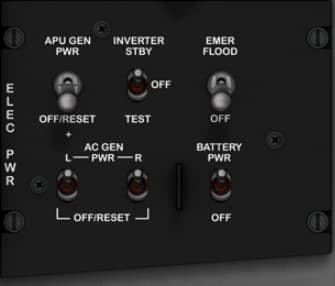
Location Right console, upper section — positioned below the Canopy Jettison and Caution Light panels. Purpose Controls the main aircraft electrical power systems, including power generation, battery control, and emergency lighting. This panel allows the pilot to manage power distribution between the APU generator, AC generators, battery, and inverter, ensuring stable operation across all flight phases and during engine starts. Controls APU GEN PWR Switch (OFF/RESET) — Controls the Auxiliary Power Unit generator. OFF: Disengages the APU generator. RESET: Resets the generator circuit breaker after a fault trip. AC GEN PWR Switches (L and R, OFF/RESET) — Independently control the left and right main engine-driven AC generators. OFF: Disconnects generator from the electrical bus. RESET: Reconnects generator after fault isolation. INVERTER STBY Switch (OFF / TEST) — Controls and tests the AC inverter that converts DC battery power to AC for essential systems. OFF: Inverter off. TEST: Verifies inverter output operation. BATTERY PWR Switch (OFF / ON) — Enables or disables DC battery power to the aircraft electrical bus. OFF: Disconnects battery from main power bus. ON: Activates battery-powered circuits for startup and backup operation. EMER FLOOD Switch (OFF / ON) — Controls the cockpit’s emergency floodlight circuit, providing illumination in case of total power failure. Recommended hardware (simpit) 3 × 2-position ON–OFF toggle switches for BATTERY PWR, EMER FLOOD, and INVERTER STBY. 3 × guarded or locking toggle switches for APU GEN PWR and AC GEN PWR (L/R) to simulate OFF/RESET behavior. Optional indicator LEDs for generator and battery status feedback. Construction Panel material: 3 mm matte black acrylic, engraved white lettering. Mount depth: ~25 mm to accommodate toggle clearance. Lighting: Indirect cockpit flood illumination only (no internal backlighting). Notes (DCS-BIOS) Fully functional in DCS A-10C: APU_GEN_PWR_SW L_AC_GEN_PWR_SW R_AC_GEN_PWR_SW INVERTER_STBY_SW BATTERY_PWR_SW EMER_FLOOD_SW These bindings allow complete synchronization with in-sim power systems, including realistic start-up sequences and generator reset actions.

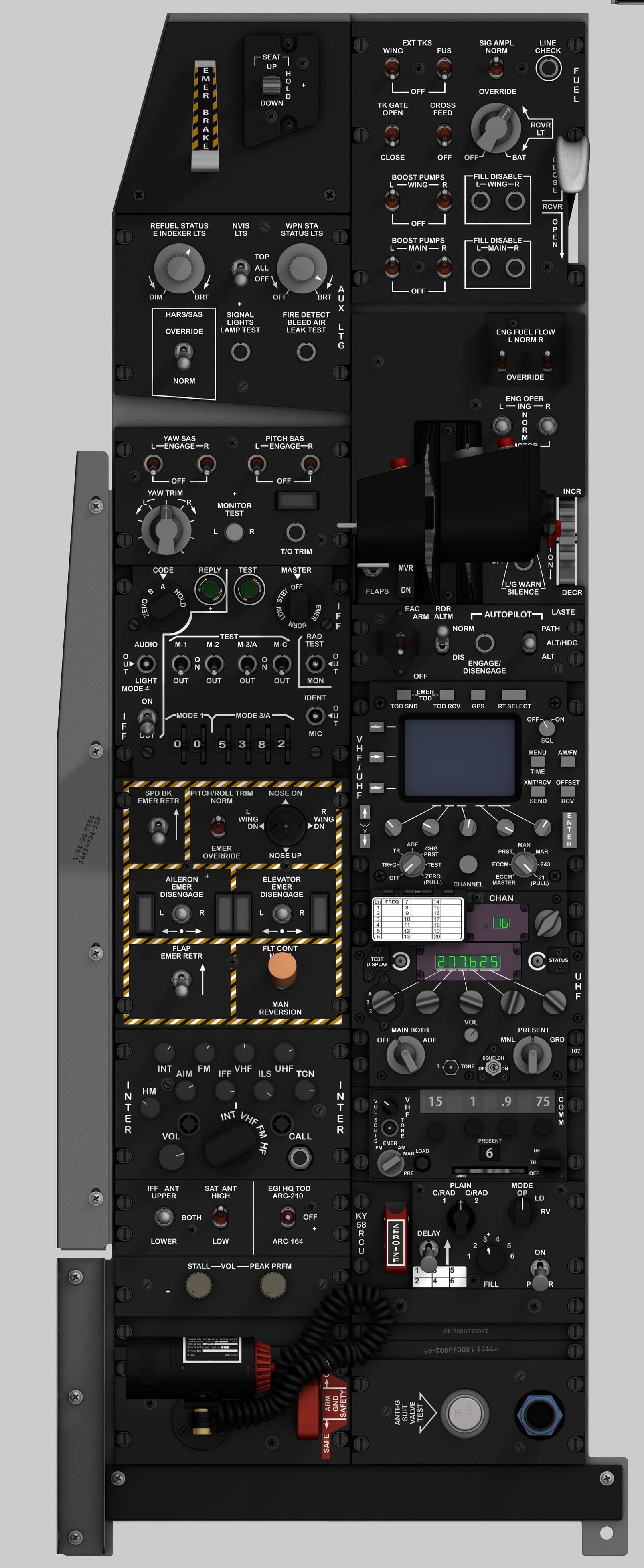
Emergency Brake & Seat Height Adjustment Panel
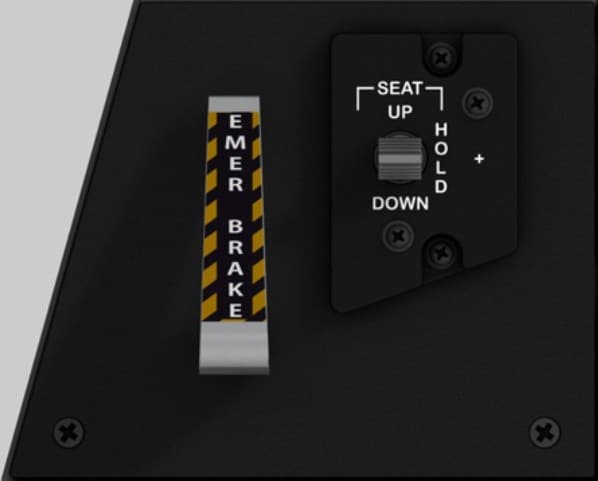
Location Front section of the left console, immediately beside the pilot’s seat. Purpose Provides emergency braking capability in case of hydraulic failure and allows the pilot to adjust the seat position vertically for visibility and comfort. Controls EMER BRAKE Handle — Mechanical lever; spring-loaded; yellow/black hazard stripe; used to manually apply brakes when hydraulic pressure is lost. SEAT UP / HOLD / DOWN Switch — Three-position momentary rocker; controls electric seat height adjustment. “UP” raises the seat, “DOWN” lowers it, and “HOLD” maintains position. Recommended hardware Emergency Brake Lever: Custom 3D-printed handle, 8 mm steel or brass shaft, potentiometer or hall sensor (0–5 V analog input) for position sensing. Seat Switch: ON-OFF-ON momentary toggle or spring-loaded rocker (MTS-223 or equivalent). Optional tactile feedback spring for realistic resistance. Construction Single acrylic faceplate (3 mm) mounted to the left console frame. Lever bracket behind panel includes potentiometer mount and return spring anchor. Optional laser-engraved hazard decal (black/yellow) applied over lever slot. Lighting No integrated backlighting in the real A-10C; optional indirect cockpit floodlight illumination may be simulated with a low-intensity LED.

Engine and APU Instrument Cluster
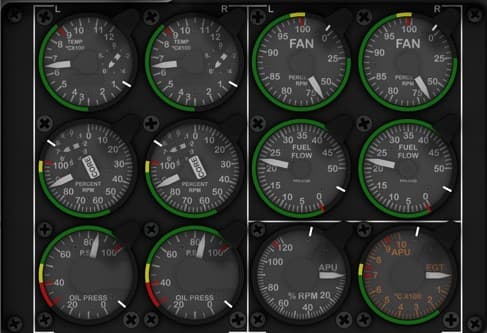
Function Description: The Engine and APU Instrument Cluster provides all critical engine performance and status indications for the A-10C. It displays parameters such as fan speed, core speed, oil pressure, temperature, fuel flow, and exhaust gas temperature (EGT) for both left (L) and right (R) engines, plus indicators for the Auxiliary Power Unit (APU). This cluster allows the pilot to monitor engine health, manage throttle settings, and confirm engine start sequences. Instrument Descriptions 1. Left Engine – Temperature (TEMP L) Function: Indicates left engine turbine temperature (°C × 100). Type: Analog gauge (servo/stepper-driven). Scale: 0 – 12 × 100 °C. 2. Right Engine – Temperature (TEMP R) Function: Indicates right engine turbine temperature (°C × 100). Type: Analog gauge (servo/stepper-driven). Scale: 0 – 12 × 100 °C. 3. Left Engine – Fan Speed (FAN L) Function: Displays the low-pressure fan RPM percentage of the left engine. Type: Analog gauge. Scale: 0 – 110 %. 4. Right Engine – Fan Speed (FAN R) Function: Displays the low-pressure fan RPM percentage of the right engine. Type: Analog gauge. Scale: 0 – 110 %. 5. Left Engine – Core Speed (CORE L / N2%) Function: Indicates the high-pressure core compressor RPM percentage. Type: Analog gauge. Scale: 0 – 110 %. 6. Right Engine – Core Speed (CORE R / N2%) Function: Indicates the high-pressure core compressor RPM percentage. Type: Analog gauge. Scale: 0 – 110 %. 7. Left Engine – Fuel Flow (FF L) Function: Measures fuel flow to the left engine in pounds per hour (PPH × 1000). Type: Analog gauge. Scale: 0 – 12 × 1000 PPH. 8. Right Engine – Fuel Flow (FF R) Function: Measures fuel flow to the right engine in pounds per hour (PPH × 1000). Type: Analog gauge. Scale: 0 – 12 × 1000 PPH. 9. Left Engine – Oil Pressure (OIL L) Function: Displays oil pressure for the left engine in PSI. Type: Analog gauge. Scale: 0 – 100 PSI, color-coded (Red/Yellow/Green). 10. Right Engine – Oil Pressure (OIL R) Function: Displays oil pressure for the right engine in PSI. Type: Analog gauge. Scale: 0 – 100 PSI, color-coded. 11. APU – RPM Function: Indicates the APU turbine speed as a percentage of maximum RPM. Type: Analog gauge. Scale: 0 – 120 %. 12. APU – EGT Function: Displays the Exhaust Gas Temperature of the APU in °C × 100. Type: Analog gauge. Scale: 0 – 12 × 100 °C.

Environmental Control Panel
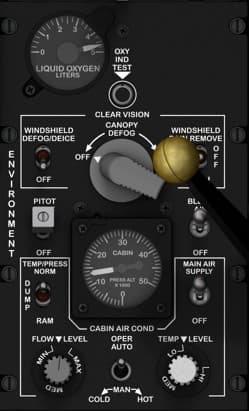
Location Right console, lower mid-section — immediately below the Oxygen Regulator Panel and adjacent to the canopy disengage handle. Purpose Controls the aircraft’s environmental systems, including cabin air conditioning, defogging, temperature control, and pressurization. This panel allows the pilot to manage cockpit comfort and visibility while monitoring cabin pressure and oxygen levels. Controls LIQUID OXYGEN LITERS Gauge — Displays the quantity of liquid oxygen available for the pilot’s oxygen system. OXY IND TEST Button — Tests oxygen indicator functionality by simulating a pressure signal. CLEAR VISION / CANOPY DEFOG Lever: OFF: No airflow directed to the canopy. ON: Directs bleed air for canopy defogging. Positioned forward/backward: Controls airflow volume. WINDSHIELD DEFOG/DEICE Switch (OFF / ON): Activates windshield anti-icing and defog system. WINDSHIELD RAIN REMOVE Switch (OFF / ON): Activates windshield rain removal airflow. PITOT Switch (OFF / ON): Powers pitot tube heat to prevent icing. TEMPR/PRESS (TEMP/PRESS) Selector: NORM: Normal cabin pressurization. DUMP: Depressurizes cabin for emergency or maintenance. RAM: Uses ram air for ventilation (non-pressurized). MAIN AIR SUPPLY Switch (OFF / ON): Enables bleed air supply from engines to environmental systems. CABIN AIR COND (OPR/AUTO): OPER: Manual control. AUTO: Automatic control of environmental system. FLOW LEVEL Knob: Adjusts the amount of airflow to the cockpit. TEMP LEVEL Knob: Adjusts cabin air temperature (COLD ↔ HOT). CABIN PRESS Indicator: Displays cabin altitude and pressure differential (PSI x1000). Recommended hardware (simpit) 5 × 2-position ON–OFF toggle switches (for Pitot, Main Air, Defog, Deice, Rain Remove). 2 × rotary potentiometers (for Temp and Flow knobs). 1 × lever axis or 3D printed handle (for Canopy Defog lever). 1 × analog or servo gauge (for cabin pressure display). Optional LED indicator for OXY TEST simulation. Construction Panel material: 3 mm black matte acrylic with engraved white legends. Lever: Custom 3D printed arm with brass or aluminum knob (~15 mm diameter). Backlighting: Indirect floodlight or edge-lit option for immersion. Notes (DCS-BIOS) Available bindings include: MAIN_AIR_SUPPLY_SW CABIN_TEMP_KNOB CABIN_FLOW_KNOB WINDSHIELD_DEFOG_SW CABIN_PRESS_GAUGE OXY_QTY_GAUGE Real aircraft operation The system uses bleed air from the engines to maintain cockpit temperature, pressure, and visibility. Environmental controls are essential for high-altitude flight comfort and oxygen management. Would you like me to include the 3D printable lever mechanism (for the canopy defog control with realistic resistance and range)? It would fit perfectly into your modular panel design.

Exterior & Interior Lighting Control Panel
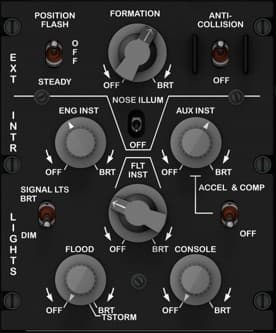
Location Right console, lower section — directly below the compass panel and beside the ILS and TACAN panels. Purpose Controls all external and internal lighting systems of the A-10C, including position, formation, and anti-collision lights, as well as instrument, flood, and console lighting. Provides independent brightness and operational control for each lighting group, supporting both day and night operations. Controls External Lights Section (EXT LTS) POSITION FLASH (STEADY / OFF): Selects position light mode. STEADY: Constant illumination. OFF: Turns off navigation position lights. FORMATION (OFF / BRT): Rotary knob controls brightness of formation lights on wingtips and fuselage. ANTI-COLLISION (OFF / ON): Toggles the rotating beacon (strobe) on or off. NOSE ILLUM (OFF / ON): Center toggle switch controlling nose-mounted floodlight for taxiing and ground operations. Interior Lights Section (INTR LTS) ENG INST (OFF–BRT): Rotary knob adjusts illumination of engine instrument panel. AUX INST (OFF–BRT): Rotary knob for auxiliary instrument lighting (miscellaneous right console instruments). FLT INST (OFF–BRT): Rotary knob for main flight instrument backlighting. SIGNAL LTS (DIM / BRT): Two-position toggle controlling indicator light brightness. FLOOD (OFF–BRT / T-STORM): Rotary knob controlling cockpit floodlights. T-STORM: Maximum brightness setting for lightning/storm conditions. CONSOLE (OFF–BRT): Rotary knob controlling console and side panel illumination. ACCEL & COMP (OFF / ON): Controls lighting for the accelerometer and compass indicators. Recommended Hardware (simpit build) 5 × Rotary potentiometers (for ENG INST, AUX INST, FLT INST, FLOOD, CONSOLE). 4 × Toggle switches (for POSITION, SIGNAL LTS, NOSE ILLUM, ACCEL & COMP). 1 × Rotary potentiometer with detent (FORMATION BRT). 1 × Toggle switch (ANTI-COLLISION). Construction Panel material: 3 mm black acrylic with engraved white text. Knobs: 15–20 mm diameter with white pointers. Backlighting: Optional indirect green LED for realism. Layout: Upper section (external), lower section (internal) divided by engraved horizontal line. DCS-BIOS Bindings EXT_POS_FLASH_SW EXT_FORMATION_KNOB EXT_ANTI_COLL_SW EXT_NOSE_ILLUM_SW INT_ENG_INST_KNOB INT_AUX_INST_KNOB INT_FLT_INST_KNOB INT_SIGNAL_LTS_SW INT_FLOOD_KNOB INT_CONSOLE_KNOB INT_ACCEL_COMP_SW Real Aircraft Operation This panel provides full manual control of all cockpit and external lighting systems. It is used by pilots to tailor illumination levels during various mission phases: takeoff, combat, night flight, or landing. Typical Use: Set external lights to STEADY or OFF depending on mission. Adjust formation and anti-collision lights for visibility. Set internal lights for optimal brightness during night ops. Enable T-STORM only during severe weather for maximum cockpit visibility.

External Stores Jettison Panel
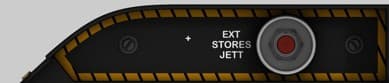
Function Description: The External Stores Jettison Panel provides a dedicated, emergency function to release all external stores from the aircraft pylons. When pressed, the jettison button sends an electrical signal to disengage the bomb rack latches, instantly releasing external fuel tanks or ordnance. This feature is used in critical situations, such as engine flameout recovery, drag reduction, or combat damage avoidance. Control Description EXT STORES JETT Button Function: Instantly releases all external stores (fuel tanks, bombs, or pods). Action: Momentary push-button; must be pressed deliberately to activate. Safety: In the real A-10C, this button is guarded or recessed to prevent accidental activation. Type: Momentary push button (normally open). Label: “EXT STORES JETT” (white text, black background with yellow hazard border). Suggested Hardware Components Push Button: 1 × Momentary push button, red cap (12–16 mm diameter). Optional: Guarded or recessed mounting for safety authenticity. Backlighting: Yellow/amber LED strip beneath hazard border for realism. Optional white LED behind text for illumination. Panel Build Recommendation Top Layer: 3 mm clear acrylic, front-painted black with engraved text and hazard stripes (engrave lightly for clean yellow paint infill). Mid Layer: 5 mm support for button housing and LED mount. Rear Layer: 2 mm mounting plate for electronics.

Fire Extinguisher Discharge Panel
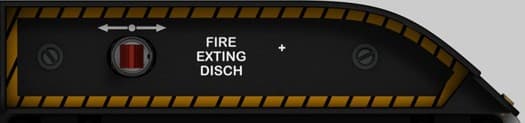
Location Front lower right side of the cockpit, below the TISL and Circuit Breaker panels, positioned just above the sidewall edge near the pilot’s right thigh. Purpose Provides manual control for the engine and APU fire suppression system, allowing the pilot to discharge fire extinguishing agent into the designated compartment in the event of an onboard fire. Controls & Indicators FIRE EXTING DISCH Handle Type: Sliding or guarded pull handle (mechanical actuator). Function: When pulled or pushed, discharges one of two fire extinguisher bottles into the selected engine or APU bay. Mechanically linked to the fire extinguisher control valve. The action is irreversible once triggered (real aircraft). Indicator Light (Optional in Simpit Version) Color: Red or amber backlight (in real aircraft, may not illuminate). Function: Indicates system armed or discharge triggered status. Recommended Hardware (Simpit Build) Component Type / Notes Handle 3D-printed cylindrical or rectangular handle with red transparent tip Sensor Momentary push button or limit switch (detects full travel for signal trigger) Mount 3 mm acrylic panel with yellow/black hazard engraving Optional feedback Red LED behind translucent handle for “armed/discharged” feedback Safety Mechanical spring return (optional, for realism only)

Flight Control Emergency Override Panel
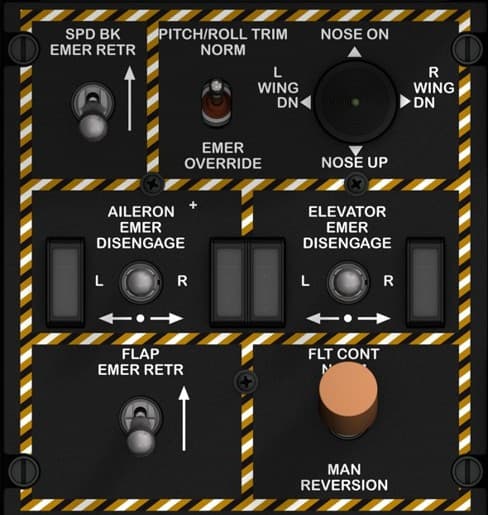
Panel name Flight Control & Emergency Override Panel Location Left console, below the Autopilot and LASTE panel. Purpose Provides manual control and emergency override functions for the aircraft’s primary flight control systems. It allows the pilot to disengage hydraulic control servos, operate trim in emergency mode, and revert to manual (mechanical) flight control if both hydraulic systems fail. Controls SPD BK EMER RETR Switch — Two-position toggle switch to retract speed brakes in an emergency (momentary ON). PITCH/ROLL TRIM Switch (NORM / EMER OVERRIDE) — Two-position toggle; enables emergency trim system bypassing the normal electrical circuit. NOSE ON Control (Trim Hat) — Four-way hat switch allowing manual trim adjustment: Nose Up / Nose Down / Left Wing Down / Right Wing Down. AILERON EMER DISENGAGE Switches (L / R) — Two guarded two-position toggles to disengage the left and right aileron hydraulic actuators. ELEVATOR EMER DISENGAGE Switches (L / R) — Two guarded two-position toggles to disengage the left and right elevator hydraulic actuators. FLAP EMER RETR Switch — Two-position toggle to retract flaps in case of hydraulic failure. FLT CONT Switch (NORM / MAN REVERSION) — Two-position rotary selector; enables manual reversion mode, connecting flight controls directly to control cables bypassing hydraulics. Recommended hardware Toggles: 1 × ON-OFF momentary for SPD BK EMER RETR 1 × ON-ON for PITCH/ROLL TRIM NORM/EMER 4 × ON-OFF (guarded) for AILERON and ELEVATOR EMER DISENGAGE 1 × ON-OFF for FLAP EMER RETR Trim Hat: 1 × 4-way momentary hat switch (with common ground) Rotary Selector: 1 × 2-position rotary or toggle with distinctive orange cap for FLT CONT Construction 3 mm matte black acrylic faceplate with engraved white legends and yellow/black caution border. Use M3 hardware for mounting; toggles spaced at least 15 mm center-to-center. “MAN REVERSION” knob recommended in brown or orange for visual realism. Lighting Green LED backlighting behind legends. Optional amber LED highlighting the border to accent emergency use.

Front Console Electronic I/O
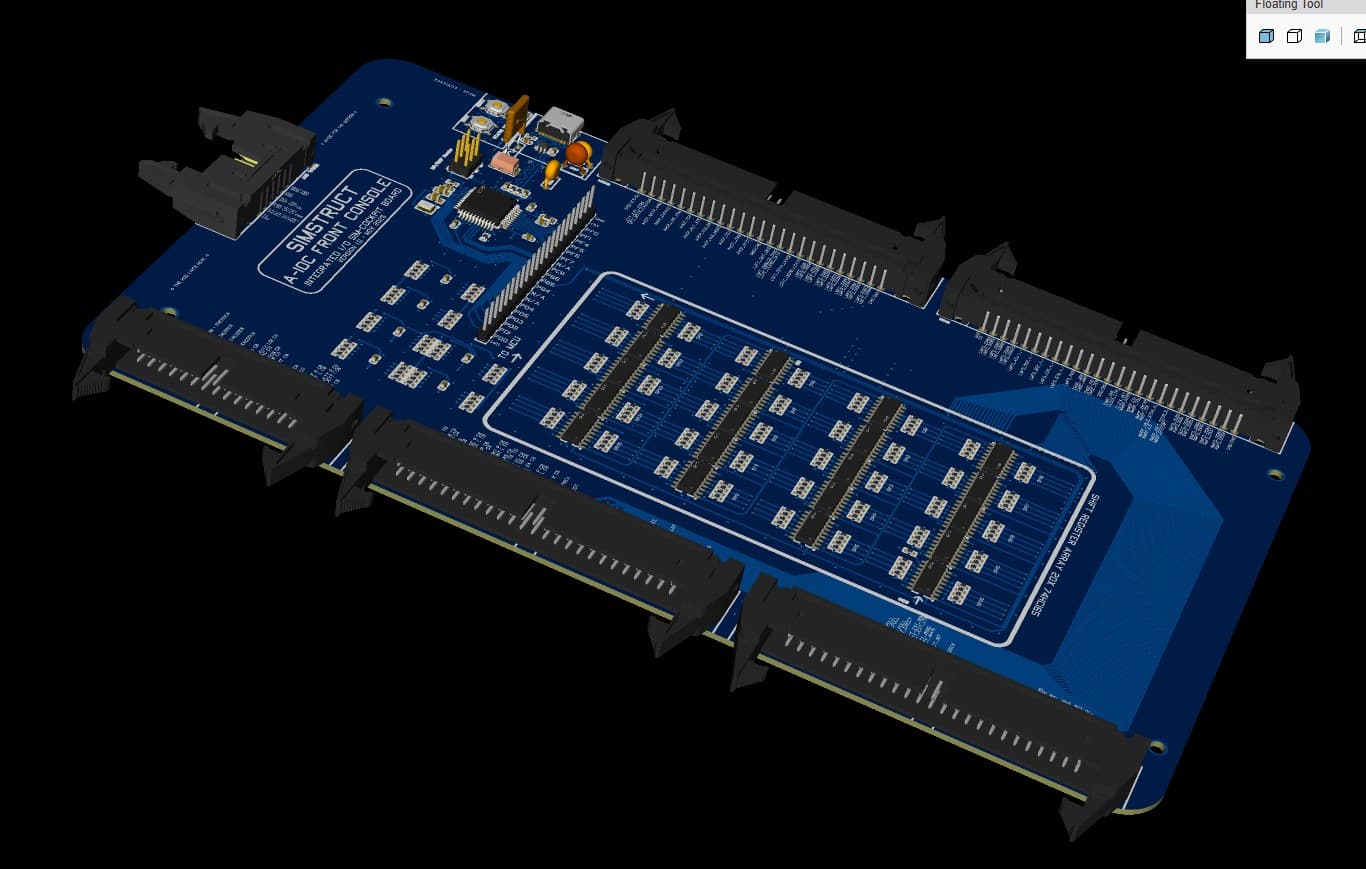
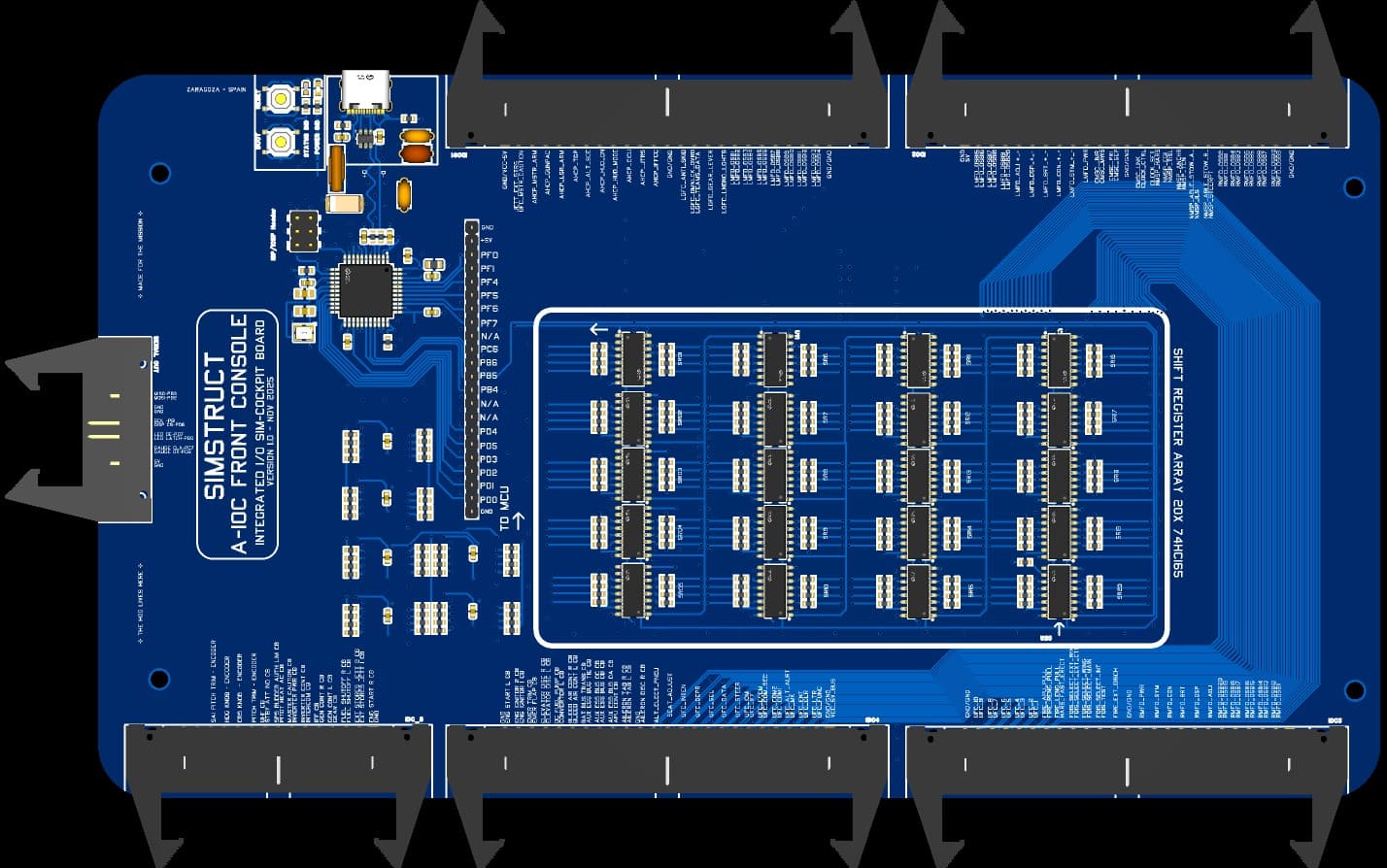
Integrated I/O Interface for High-Fidelity Cockpit Builds The Simstruct A-10C Front Console Input Board is the central nervous system of your cockpit. Designed from the ground up for maximum reliability, clean wiring, and true A-10C mapping, this board brings every switch, encoder, button, and panel control from the front console into a single, unified hub. Built around a USB-native ATmega32U4 microcontroller and a high-density array of 74HC165 input shift registers, it offers over 160+ digital inputs, clean signal conditioning, and fully protected USB-C connectivity. Every pin is mapped to real DCS-BIOS functions and cockpit labels to make wiring intuitive and error-free. Key Features 160+ Debounced Digital Inputs 20× 74HC165 shift registers for rock-solid switch capture. True Plug-and-Play DCS Integration Comes pre-mapped with A-10C naming conventions for instant recognition. USB-C Power & Data with Full Protection Includes ESD diodes, fuse protection, CC resistors, and differential-pair routing for safe, clean operation. On-Board High-Stability MCU ATmega32U4 running native USB HID/Serial for full DCS-BIOS compatibility. Four 50-Pin IDC Panel Connectors Clean routing of all front-console panels into the board with minimal cabling. Future-Proof Serial Expansion Port Includes a dedicated bus to connect the upcoming Output Board (LEDs, displays, gauges, counters). Industrial-Grade PCB Layout Professional grounding, isolated VBUS region, solid decoupling, and ferrite-filtered AVCC for stable analog performance. Designed for Real Builders Mechanical design, silkscreen labeling, and connector placement match the real A-10C front console layout — reducing build time and wiring confusion. This input board is the foundation of the complete Simstruct Front Console System: robust, expandable, and engineered for long-term cockpit projects.

Fuel Control Panel
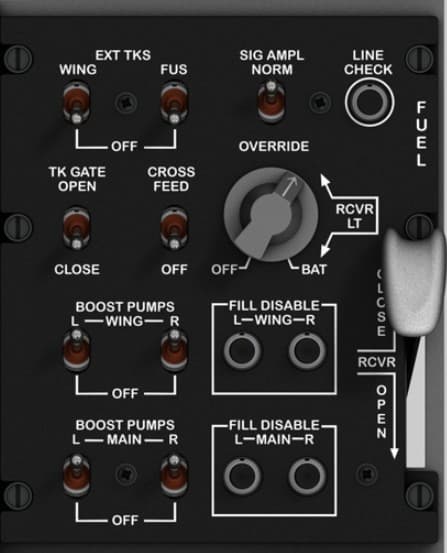
Location Upper left console, directly behind the Emergency Brake and Seat Adjustment panel. Purpose Manages the aircraft’s entire fuel system — including internal and external tanks, cross-feed, refueling, and boost pumps — to ensure balanced fuel distribution and engine feed during all flight conditions. Controls EXT TKS (WING / FUS) — Two 2-position toggles controlling the external wing and fuselage tanks (ON/OFF). SIG AMPL (NORM / OVERRIDE) — Rotary selector to switch signal amplification for fuel system sensors and indicators. LINE CHECK Button — Momentary pushbutton used to verify fuel line integrity and flow test. TK GATE (OPEN / CLOSE) — Controls the fuel transfer gate between tanks. CROSS FEED (OFF / ON) — Enables fuel cross-feed between left and right engines. BOOST PUMPS (WING-L/R & MAIN-L/R) — Four individual toggle switches activating the left and right boost pumps in each tank group. FILL DISABLE (WING-L/R & MAIN-L/R) — Four toggles preventing unwanted refueling or transfer from specific tanks. RCVR LT Switch — Controls the fuel receptacle light for night refueling visibility. FUEL HANDLE (OPEN / CLOSE) — Mechanical lever that opens or closes the aerial refueling receptacle. Recommended hardware Toggles: 8 × 2-position maintained (ON-OFF) MTS-102 or aviation-style SPST switches. Rotary selector: 1 × 3-position (OFF / BAT / RCVR LT) rotary or ON-OFF-ON toggle. Pushbutton: 1 × momentary (normally open) illuminated type for Line Check. Lever: 1 × custom 3D-printed handle with micro switch or Hall sensor for OPEN/CLOSE detection. Construction Dual-layer acrylic panel (3 mm faceplate + 5 mm sub-layer) with engraved white text and guarded toggle holes. Optional rotary guard ring for “SIG AMPL” and lever slot cut with 1 mm tolerance. Labeling consistent with MIL-STD cockpit engraving (white on black). Lighting Internal green LED backlight (520 nm) behind engraved legends. RCVR LT switch may be simulated using a separate warm-white LED circuit.

Fuel Hydraulic Indicator Panel
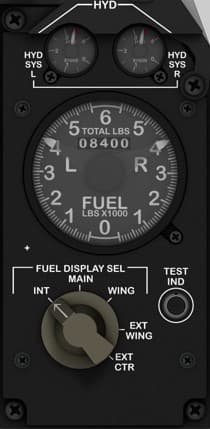
Function Description: The Fuel and Hydraulic Indicator Panel provides real-time readouts for the aircraft’s fuel distribution and hydraulic system pressures. It allows the pilot to monitor fuel levels in all tanks (internal and external) and the status of hydraulic systems A and B, both critical for flight control and gear operation. This panel includes a rotary selector to display different tank readings and a test function for system verification. Instrument and Control Descriptions 1. Hydraulic System Pressure Gauges (HYD SYS L / HYD SYS R) Function: Displays the hydraulic pressure for the left and right systems. Scale: 0 – 3,500 PSI. Type: Analog dual gauge (two independent needles). Indications: Green zone: Normal operating range (~3,000 PSI). Yellow/red: Low pressure warning zones. Type of Control: None (indicator only). 2. Fuel Quantity Indicator (FUEL LBS × 1000) Function: Indicates total and per-tank fuel load (Left, Right, and Center). Readout: Upper counter: Total fuel (in thousands of pounds). Dial pointers: Left, Right, and Center tank levels. Scale: 0 – 7,000 lbs per tank. Type: Multi-needle analog gauge (servo/stepper-driven). 3. Fuel Display Selector Knob (FUEL DISPLAY SEL) Function: Selects which fuel tanks are displayed on the fuel indicator. Positions: INT: Internal tanks only. MAIN: Main tanks (fuselage). WING: Wing tanks. EXT WING: External wing tanks. EXT CTR: External center tank. Type: 5-position rotary switch. 4. Test Indicator Button (TEST IND) Function: Initiates a self-test for the fuel and hydraulic indication systems. Action: When pressed, it simulates nominal readings for instrument verification. Type: Momentary push button (normally open).

IFF (Identification Friend or Foe) Control Panel
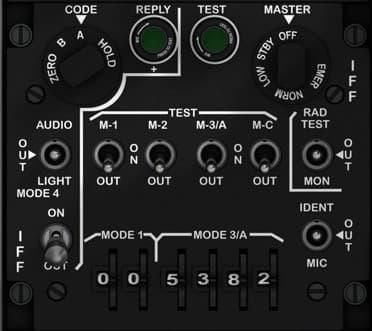
Location Left console, below the Yaw & Pitch SAS / Takeoff Trim Panel. Purpose Allows the pilot to manage the IFF transponder system, ensuring secure identification of the aircraft to friendly radar systems. Provides control over transmission modes, encryption, testing, and audio monitoring. Controls CODE Selector (ZERO / B / A / HOLD) — Four-position rotary switch used to select encryption codes or zeroize (erase) all IFF crypto data. REPLY Indicator (Green) — Illuminated light indicating a valid IFF response transmission. TEST Indicator (Green) — Illuminated light confirming system self-test status. MASTER Switch (OFF / STBY / NORM / EMER) — Four-position rotary selector for IFF transponder operational mode: OFF: System disabled. STBY: Power applied but no transmission. NORM: Standard IFF operation. EMER: Emergency squawk for distress identification. AUDIO OUT Jack — Allows headset monitoring of IFF signal tones. LIGHT Switch (ON / OFF) — Enables or disables panel lighting. MODE Selector Knobs (1, 2, 3/A, C) — Four two-position toggle switches controlling specific IFF modes used for various interrogations. MODE 3/A Code Wheels (Four-digit) — Rotating thumb wheels used to set Mode 3/A identification code (0000–7777). RAD TEST Button — Momentary pushbutton to initiate radio signal test. IDENT Button — Momentary pushbutton that forces an identification pulse reply to friendly radar systems. MIC Jack — Allows connection to aircraft comm system for direct voice identification or IFF audio monitoring. Recommended hardware Rotary switches: 1 × 4-position for CODE selector. 1 × 4-position for MASTER mode. Toggles: 4 × 2-position ON-OFF for Modes 1, 2, 3/A, and C. Pushbuttons: 2 × momentary (normally open) for RAD TEST and IDENT. Indicators: 2 × 5 mm green LEDs (REPLY, TEST). Rotary encoders or thumbwheel switches: 4 × digit wheels or 4 rotary encoders for Mode 3/A code. Construction 3 mm engraved black acrylic faceplate with white legends. Optional secondary mounting plate for encoders and LEDs. Ensure uniform spacing for toggle rows (min. 12 mm). Lighting Green backlight for labels and legends, with separate illumination for REPLY/TEST indicators. Optional diffused LED under the MODE 3/A section for clarity. Notes The IFF panel replicates the AN/APX-113 system used in the A-10C. For DCS-BIOS implementation, each mode toggle and rotary selector corresponds to discrete commands in the IFF device section. The ZERO function can be mapped as a protected command to prevent accidental activation.

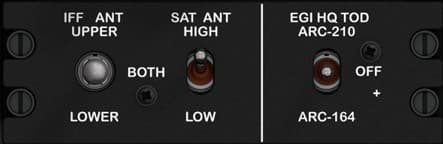
IFF/SAT Antenna & EGI HQ-TOD Select Panel
Location Left console, below the Intercom panel and just above the KY-58/secure comms area. Purpose Routes antennas and time-of-day synchronization for radios: selects which IFF antenna is used, chooses SATCOM antenna gain, and tells the EGI which radio (ARC-210 or ARC-164) provides Have Quick (HQ) Time-Of-Day. Controls IFF ANT UPPER / BOTH / LOWER — 3-position selector for the IFF transponder antenna routing. SAT ANT HIGH / LOW — 2-position toggle selecting SATCOM antenna gain. EGI HQ TOD: ARC-210 / OFF / ARC-164 — 3-position selector that assigns the radio used for HQ TOD (or disables it). Recommended hardware (simpit) IFF ANT: 1 × 3-position switch (use ON-ON-ON toggle or a 3-pos rotary). SAT ANT: 1 × 2-position ON-ON toggle. EGI HQ TOD: 1 × 3-position switch (ON-OFF-ON works well in DCS-BIOS for three discrete states). Construction 3 mm matte-black acrylic faceplate with engraved legends. Center-to-center spacing ~18 mm between toggles; use miniature toggles to match the compact real panel. Lighting Green backlight behind legends (shared light rail with adjacent comms panels). Notes (DCS-BIOS) Map each switch to its discrete control. For 3-position toggles with a floating middle (OFF), define two inputs (up/down) or use an ON-OFF-ON wired to two separate pins so each extreme is readable at startup. Add 0.1 µF caps or software debounce if needed.

ILS (Instrument Landing System) Control Panel
Location Right console, lower section — directly below the TACAN panel and adjacent to the Environmental and Lighting panels. Purpose Controls the Instrument Landing System (ILS) receiver, used for precision approach guidance. The ILS provides localizer (horizontal) and glideslope (vertical) information to aid alignment and descent during instrument approaches. Controls Power Switch PWR (OFF / ON): Rotary switch controls power to the ILS receiver. When ON, activates signal reception and localizer/glideslope indicators on the flight instruments (HSI and ADI). Frequency Display Digital readout (108.10–111.95 MHz): Displays selected ILS frequency. Frequency pairs correspond to VHF localizer and paired UHF glideslope transmitters. Volume Control VOL (Rotary Knob): Adjusts the audio level for the ILS identification tone (Morse code station ID). Recommended Hardware (simpit build) 1 × Rotary switch (for PWR ON/OFF). 1 × Rotary potentiometer (for volume adjustment). 1 × 7-segment display module or LCD (to show ILS frequency). Optional: LED indicator to show power status. Construction Panel material: 3 mm matte black acrylic, white laser engraving for text and labels. Display window: Green-tinted acrylic inset (optional). Backlighting: Subtle edge-light or rear LED for night illumination. Knobs: Power: 20 mm pointer knob. Volume: 18 mm round knob. DCS-BIOS Bindings ILS_PWR_SW ILS_FREQ_DISPLAY ILS_VOL_KNOB Real Aircraft Operation The ILS system supplements the navigation suite for instrument approaches. When the ILS power is on and a valid frequency is tuned, the HSI and ADI display deviation bars corresponding to localizer (lateral) and glideslope (vertical) signals. Typical Use Case: Power ON. Tune assigned ILS frequency. Verify Morse ID via audio. Follow HSI/ADI cues for approach.

Intercom Control Panel (INTER)
Location Left console, lower section — beneath the UHF Radio Control Panel and adjacent to the IFF Mode Select Panel. Purpose Manages internal and external communication channels, allowing the pilot to select and adjust audio sources such as intercom, radios, navigation aids, and datalinks. It also controls headset volume and provides a CALL function for crew communication. Controls INT, AIM, FM, IFF, VHF, UHF, ILS, TCN, HM Selector Knobs (8 total) — Individual rotary volume controls for each communication or navigation channel: INT: Internal intercom system (crew/headset) AIM: Airborne Intercept Missile tone audio FM / VHF / UHF: Radio channels IFF: Identification Friend or Foe audio ILS: Instrument Landing System tones TCN: TACAN navigation tone HM: Homing beacon tone MASTER Volume Knob (VOL) — Main audio level control for all channels. MODE Selector Knob (INT / VHF / FM / HF) — Selects the primary transmit mode (intercom, VHF, FM, or HF). CALL Button — Momentary pushbutton that activates the intercom call function for ground crew or internal communication. Recommended hardware Rotary potentiometers: 8 × 10 kΩ linear pots (individual channel volumes) 1 × 10 kΩ for MASTER volume Rotary switch: 1 × 4-position selector (INT / VHF / FM / HF) Pushbutton: 1 × momentary pushbutton (CALL) Construction 3 mm matte black acrylic faceplate, engraved white text. Volume knobs 12–15 mm; spacing 15–18 mm for accessibility. “INTER” engraved vertically on both edges for labeling consistency with cockpit layout. Lighting Green LED backlighting for all text and scale marks. Optional back-illumination behind knob markings for premium realism. Notes This panel interfaces directly with the A-10C’s Audio Management System, controlling which radio or navigation source is active and how audio is routed to the pilot’s headset. In DCS-BIOS, most functions can be simulated using analog inputs for potentiometers, with digital mapping for the CALL button and mode selector. When wiring multiple potentiometers to shift-register expanders, ensure proper ground isolation and decoupling capacitors (0.1 µF) to minimize analog noise.

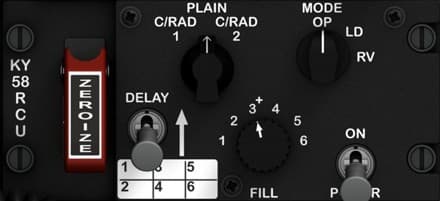
KY-58 Secure Voice Control Unit (RCU)
Location Left console, immediately below the VHF FM radio and adjacent to the antenna select and intercom panels. Purpose Controls the KY-58 Secure Voice encryption system, which provides secure (encrypted) voice communication capability over UHF, VHF, and HF radios. The panel allows the pilot to enable or disable encryption, select operation mode, manage encryption keys, and perform zeroization (erasing all crypto keys in emergencies). Controls ZEROIZE Lever (Guarded, Red) — Destroys all loaded encryption keys immediately when lifted and activated. Used in emergency situations to prevent compromise. PLAIN / C/RAD 1 / C/RAD 2 Selector — Sets transmission mode: PLAIN: Unencrypted (normal comms). C/RAD 1 / 2: Ciphered radio channel 1 or 2 (secure mode). MODE Selector (OP / LD / RV) — Sets KY-58 operating mode: OP: Normal operation. LD: Load mode (for key entry or data transfer). RV: Receive mode (for loading keys from an external source). DELAY Switch (1–6) — Six-position selector for delay timing, used in synchronization during key loading or radio operations. FILL Knob (1–6) — Rotary selector for key channel slot. Each slot stores a separate encryption key. POWER Switch (ON / P / R / OFF) — Controls system power and function: ON: Activates the unit. P: Plain (bypass encryption). R: Receive mode only. OFF: Power off. Recommended hardware (simpit) ZEROIZE: 1 × guarded toggle (ON) with red safety cover. MODE and PLAIN/C-RAD: 3-position rotary switches. DELAY and FILL: 6-position rotary switches (12-step type preferred for feel). POWER: 4-position rotary switch. Construction 3 mm matte-black acrylic faceplate with white engraved legends; ZEROIZE lever area painted red with white text. Optional backlighting via green LED strip under panel edge. Knob spacing and sizes consistent with Collins-style avionics panels. Lighting Subdued green backlighting (shared with left console lighting bus). ZEROIZE lever may have an independent red LED indicator for realism. Notes (DCS-BIOS) This panel is not yet functional in the base DCS A-10C module (KY-58 functions are not simulated). However, it can be implemented for realism with custom Arduino input mapping and lighting logic. You may assign toggle inputs to dummy DCS-BIOS functions or use them for general cockpit interactivity (e.g., power sequencing simulation).

Landing Gear Control Panel (LGCP)
This Panel is located to the bottom left of the front console and has: -The Landing gear lever -Anti skid on - on Toggle Switch. -Landing Lights on-off-on toggle switch with a 3d printed attachment for handle. -Well lock LED Indicator x3 -Flaps position gauge. (Servo Motors) -Landing gear lever. -Teams Data push button (Mom)

MFCD (Multi-Function Color Display)
Function Description: The Left MFCD is one of the two main digital multifunction displays in the A-10C cockpit. It provides real-time situational awareness and control over several aircraft systems such as navigation, targeting, weapons delivery, and communication. It can display a variety of pages including the Tactical Awareness Display (TAD), Digital Stores Management System (DSMS), Targeting Pod (TGP), and more. The MFCDs are the pilot’s primary interface for modern avionics in the A-10C. Control Elements: 20 push buttons (OSBs – Option Select Buttons) surrounding the screen (5 on each side, 10 total per MFCD). • Type: Momentary pushbuttons • Function: Each button corresponds to contextual functions shown on the MFCD bezel screen edge. 2 rotary knobs (bottom left and bottom right corners). • DAY/NIGHT/OFF switch: 3-position rotary switch for screen brightness mode. • SYM/BRT rotary: Continuous rotary potentiometer for display symbol brightness adjustment. Optional backlight control via secondary knob or software dimming. Suggested Hardware Components: 20x momentary tactile pushbuttons (round or square 12mm type, with LED optional). 1x rotary 3-position switch (ON-OFF-ON or ON-ON-ON depending on wiring logic). 1x rotary potentiometer (10kΩ linear) for brightness control. Optional: 3D printed bezel or CNC/laser-cut acrylic frame with engraved button legends. Notes for Labeling and Backlighting: Backlighting color: green (to match A-10C illumination). Engrave all bezel legends (e.g. BRT, SYM, DAY/NIGHT/OFF) on the acrylic top layer. LED light diffusion behind each button should be even; small 3mm green LEDs are ideal. Recommended acrylic stack: • 3mm top engraved panel (black-painted clear acrylic, laser-etched text). • 5mm middle layer for buttons and LED mounts. • LCD screen behind (usually 4.3"–5" display for simulated use).

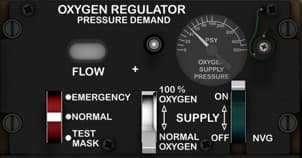
Oxygen Regulator Panel
Location Right console, mid-section — mounted to the right of the CDU, directly above the Environmental Control Panel. Purpose Controls the pilot’s oxygen delivery system, regulating pressure, flow rate, and oxygen concentration during flight. This system ensures proper oxygen supply at varying altitudes and allows emergency override or test functions when needed. Controls FLOW Indicator (Mechanical or Electronic) — Displays oxygen flow activity during breathing; oscillates with inhalation and exhalation. Flow Adjustment Knob (+ / –) — Adjusts the oxygen flow rate in pressure-demand mode. EMERGENCY / NORMAL / TEST MASK Switch: EMERGENCY: Supplies 100% oxygen at positive pressure for smoke or contamination conditions. NORMAL: Provides automatic oxygen delivery based on cabin altitude. TEST MASK: Verifies oxygen flow through the pilot’s mask during pre-flight checks. SUPPLY Lever (OFF / NORMAL OXYGEN / 100% OXYGEN): OFF: Shuts off oxygen flow to the mask. NORMAL OXYGEN: Standard operation, mixes oxygen with cabin air as needed. 100% OXYGEN: Forces 100% oxygen regardless of altitude. Pressure Gauge: Displays system supply pressure in PSI. Normal reading: ~70–120 PSI when system active. Recommended hardware (simpit) 2 × 3-position toggle switches (ON-ON-ON) for SUPPLY and EMERGENCY/NORMAL/TEST MASK controls. 1 × Rotary potentiometer (10kΩ) for flow adjustment simulation. 1 × Analog gauge (servo-driven or LED bar) for supply pressure simulation. Optional LED indicator to represent oxygen flow activity. Construction Panel thickness: 3 mm matte acrylic, engraved white lettering. Knobs: Custom 3D printed or aluminum, 15–18 mm diameter. Lighting: Dim green or white backlighting via edge-lit acrylic or micro-LEDs. Notes (DCS-BIOS) Bindings for full simulation include: OXY_SUPPLY_LEVER OXY_MODE_SWITCH OXY_PRESS_GAUGE OXY_FLOW_INDICATOR This allows realistic synchronization of oxygen pressure readings, lever positions, and switch states. Real aircraft notes The A-10C uses a diluter-demand oxygen system, automatically adjusting oxygen mix based on cabin altitude, with pressure-demand override for emergency use.

Primary Flight Instrument Cluster
Function Description: This is the central core of the A-10C’s flight instrumentation system. It provides the pilot with continuous feedback on the aircraft’s flight attitude, altitude, climb rate, airspeed, navigation heading, and radar threat awareness. These analog instruments act as the pilot’s primary situational awareness tools—both during normal flight and as backups in case of MFD or HUD failure. Instruments Overview (Top to Bottom, Left to Right) 1. Radar Warning Receiver (RWR) – AN/ALR-69 Display Function: Displays radar emitters detected around the aircraft, including tracking and missile launch signals. Indicators: Threat direction, type, and priority (flashing when lethal). Type: Circular CRT-style radar display. Controls: INT knob (intensity – rotary potentiometer). GUN READY indicator light (green LED). 2. Vertical Velocity Indicator (VVI) Function: Displays climb or descent rate in thousands of feet per minute. Scale: -6,000 to +6,000 ft/min. Type: Analog gauge (servo or stepper-driven). Controls: None. 3. Airspeed Indicator Function: Shows aircraft speed in knots (KIAS). Range: 0–500 knots. Type: Analog gauge (servo or stepper-driven). Controls: None. 4. Attitude Director Indicator (ADI) Function: Displays aircraft pitch, roll, and flight director information. Type: Electro-mechanical gyro (in simulation: servo-driven or LCD-rendered). Controls: Pitch adjustment knob (rotary potentiometer). Cage knob (momentary pull). 5. Altimeter Function: Displays aircraft altitude in feet above sea level. Scale: 0–50,000 ft. Sub-display: Barometric pressure setting (inHg). Type: Analog gauge (servo or stepper-driven). Controls: Barometric pressure knob (rotary potentiometer). 6. Horizontal Situation Indicator (HSI) Function: Combines heading, navigation, and course information. Features: Compass card, course pointer, deviation bar, and distance counter. Type: Electro-mechanical gyro or digital compass simulation. Controls: Heading Set knob (rotary encoder). Course Set knob (rotary encoder).

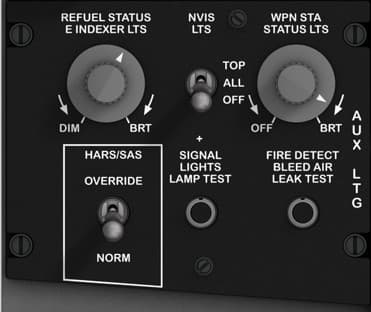
Signal Lights & Fire Detection / HARS-SAS Override Panel
Location Left console, directly behind the Fuel Control Panel. Purpose Controls auxiliary cockpit lighting, performs system lamp and fire detection tests, and provides manual override control for the Heading and Attitude Reference System (HARS) and Stability Augmentation System (SAS). Controls REFUEL STATUS & INDEXER LTS (DIM–BRT) — Rotary potentiometer controlling brightness of refueling status and indexer lights. WPN STA STATUS LTS (DIM–BRT) — Rotary potentiometer controlling brightness of weapon station status lights. TOP / ALL / OFF Selector — Three-position rotary switch selecting which lights to test (TOP only, ALL lamps, or OFF). SIGNAL LIGHTS LAMP TEST Button — Momentary pushbutton used to initiate lamp test for all cockpit indicators. FIRE DETECT / BLEED AIR LEAK TEST Button — Momentary pushbutton used to simulate overheat and fire conditions to test warning lights and sensors. HARS/SAS Override (OVERRIDE–NORM) — Two-position toggle switch used to manually bypass or restore the HARS/SAS automatic control circuits. Recommended hardware Rotary knobs: 2 × 10 kΩ linear potentiometers (for DIM–BRT control). Selector: 1 × 3-position rotary switch (OFF–TOP–ALL). Pushbuttons: 2 × momentary (normally open) pushbuttons, ideally backlit. Toggle: 1 × ON-OFF maintained toggle for HARS/SAS override. Construction Single 3 mm black acrylic faceplate with engraved white legends. Backplate optional for LED diffusion and wiring stability. HARS/SAS toggle should be metal-guarded for authenticity. Lighting Sub-panel backlight using green (520 nm) LEDs for DIM–BRT adjustment controls. Optional integration of warm-white LEDs behind test buttons for visibility.

Stall Warning & Peak Performance Adjustment Panel
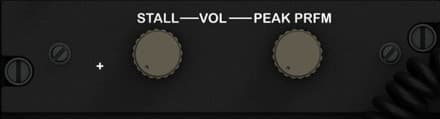
Location Lower section of the left console, just above the Anti-G and oxygen system area. Purpose Provides audio volume adjustment for stall warning tone and calibration of the peak performance indicator system, which assists the pilot in maintaining optimum aircraft performance under high angle-of-attack conditions. Controls STALL VOL Knob — Adjusts the volume of the stall warning tone heard in the pilot’s headset. Turning clockwise increases the warning tone intensity. PEAK PRFM Knob — Used by maintenance crews or pilots to calibrate or fine-tune the peak performance (AOA) system. Normally left in its preset detent during flight. Recommended hardware (simpit) 2 × 10 kΩ rotary potentiometers with push-fit tactile knobs. Optional shared encoder for fine digital calibration if connected to analog input (0–5 V). Knobs: 12–15 mm diameter, flat-topped military gray style to match console aesthetic. Construction 3 mm black matte acrylic faceplate with engraved white legends. Standard 18 mm spacing between knob centers. Mount directly above left-console side panels for ease of wiring to the main audio bus. Lighting Indirect illumination from console floodlights only (no dedicated backlighting). Notes (DCS-BIOS) Not implemented in the base DCS A-10C module, but can be simulated using analog potentiometers mapped to sound or warning light intensity in external cockpit controllers. For immersive setups, map STALL VOL to a sound output gain channel and PEAK PRFM to an analog trim or placeholder function.

TACAN Control Panel
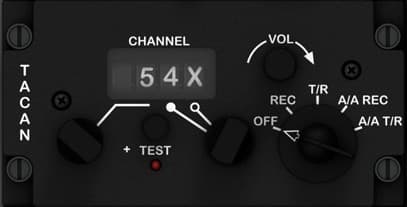
Location Right console, lower mid-section — located directly below the CDU/EGI Navigation Control Panel. Purpose Controls the Tactical Air Navigation (TACAN) system, which provides bearing and distance to ground-based or airborne beacons for en-route navigation, air-to-air ranging, and formation flight coordination. Controls Channel Selector CHANNEL Display: Digital numeric window showing selected TACAN channel (e.g., 54X). CHAN Selector Knob: Rotates to select the desired channel (1–126). Press to toggle X/Y mode. TEST Section TEST Button: Initiates a system self-test. When pressed, the channel display flashes and signal indicators respond if functional. Red indicator light below illuminates during test sequence. MODE Selector Knob (5-position rotary): OFF: System powered down. REC: Receives TACAN signals only (no transmission). T/R: Standard transmit/receive mode for distance and bearing. A/A REC: Air-to-air receive mode for ranging to another aircraft. A/A T/R: Air-to-air transmit/receive — both aircraft exchange range data. VOLUME Knob (Rotary, continuous): Adjusts audio level of TACAN signal identification tone (Morse code ID). Recommended Hardware (simpit build) 1 × 5-position rotary switch (OFF, REC, T/R, A/A REC, A/A T/R). 1 × Momentary push button (for TEST). 1 × Rotary encoder with push (for CHANNEL selection + X/Y toggle). 1 × Rotary potentiometer (for volume control). Optional: 7-segment display or LCD to show channel number (e.g., via Arduino). Construction Panel material: 3 mm matte black acrylic, white laser-engraved labels. Display window: Transparent acrylic inset with green tint (imitating real electro-luminescent display). Backlighting: Edge-lit green or indirect LED for realism. Knobs: Volume and channel knobs: ~18 mm diameter. Mode selector: ~25 mm diameter with pointer indicator. DCS-BIOS Bindings TACAN_MODE_SW TACAN_CHAN_SELECTOR TACAN_VOL_KNOB TACAN_TEST_BTN TACAN_DISPLAY Real Aircraft Operation The TACAN system provides precise range and bearing to a ground station or cooperating aircraft. The A-10C uses it as part of its navigation redundancy suite, often in combination with EGI and CDU data. Typical Usage: Set the channel and mode to T/R. Verify tone and bearing on HSI. Adjust VOLUME to hear Morse ID for station verification.

TISL (Target Identification Set – Laser) Control Panel
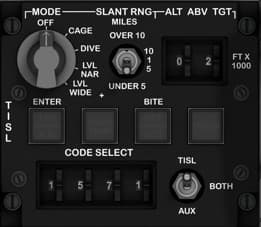
Location Front lower center console — positioned between the pilot’s knees, directly above the Breakout/Environmental panel and below the main instrument cluster. Purpose Controls the AN/AAS-35(V) Pave Penny laser spot tracker, which detects reflected laser energy from ground-designated targets. It allows the pilot to set laser codes, select modes, and monitor system status. Controls & Indicators MODE Selector Knob 5-position rotary switch: OFF – Power off. CAGE – Stabilizes TISL gimbal for ground alignment. DIVE – Sets scan geometry for dive deliveries. LVL NAR – Level flight, narrow field of view. LVL WIDE – Level flight, wide field of view. SLANT RNG (Range Selector) Rotary knob selects range scale for target distance display: OVER 10 miles 10 / 5 / 1 / UNDER 5 miles ALT ABOVE TARGET Indicator Mechanical or digital counter (in hundreds of feet). Displays altitude difference between aircraft and tracked target. CODE SELECT Wheels (4-digit) Rotary selectors for laser spot code (1000–1788 range). Defines which laser-coded spot the sensor will detect. Includes ENTER push button to confirm code input. TISL AUX Switch 3-position toggle switch: AUX – Uses auxiliary input from backup system. BOTH – Dual redundancy (main and aux). OFF – Deactivates system power. BITE (Built-In Test Equipment) Button Activates internal self-test sequence. Adjacent annunciators indicate system health: OVER TEMP (amber) DET ACD (Detector Active) TRACK (Target lock indicator) Recommended Hardware (Simpit Build) 1 × 5-position rotary switch (MODE). 1 × 5-position rotary switch (RANGE). 1 × 3-position toggle switch (TISL AUX). 1 × push button (ENTER). 1 × push button (BITE). 4 × rotary wheels or rotary encoders (CODE SELECT). 3 × LED indicators (OVER TEMP, DET, TRACK). Construction Panel material: 3 mm matte black acrylic with white laser engraving. Knobs: Military-style with white markings. Lighting: Soft green backlight for night operations. Optional: Use 7-segment LED or mechanical counter for ALT indicator simulation. DCS-BIOS Bindings TISL_MODE_SW TISL_RANGE_SEL TISL_ALT_DISPLAY TISL_CODE_DIGIT_[1–4] TISL_ENTER_BTN TISL_BITE_BTN TISL_AUX_SW TISL_STATUS_[OVERTEMP/DET/TRACK] Real Aircraft Operation The TISL system was designed to passively detect laser reflections from ground designators, aiding target identification without emitting radiation. Normal use procedure: Power system to LVL NAR or LVL WIDE. Input correct laser code via CODE SELECT. Press ENTER. Observe TRACK light when a valid laser spot is detected. Use altitude indication and slant range for targeting confirmation. Note: In the A-10C II, the TISL is typically disabled, as modern targeting pods (e.g., Litening, Sniper) have replaced its function.

UHF Radio Control Panel (AN/ARC-164)
Location Left console, lower mid-section — directly beneath the VHF/UHF (ARC-210) radio control panel. Purpose Provides manual and preset frequency control for UHF communication, allowing secure voice communication between aircraft and ground control. The pilot can switch channels, test display functions, set guard frequencies, and adjust volume or squelch. Controls Frequency Display (Green LED) — Indicates active operating frequency or channel information (e.g., 277.625 MHz). Channel Display (Green LED) — Displays the selected channel number (1–20). TEST DISPLAY Button — Momentary pushbutton that activates the display test function, illuminating all digits and indicators. STATUS Indicator — Displays UHF radio operational status (e.g., ON, FAIL). MODE Selector (A / M / 1 / 2 / 3) — Rotary selector for preset group selection or channel bank. MAIN / BOTH / ADF Selector — Rotary switch: OFF: Power off MAIN: Primary radio only BOTH: Transmit/receive both main and guard frequencies ADF: Enables Automatic Direction Finder mode for navigation PRESENT / MNL / GRD Selector — Rotary switch: PRESENT: Uses selected channel preset MNL: Manual frequency tuning GRD: Guards emergency frequency (243 MHz) TONE Switch (T / OFF) — Enables sidetone during transmission for headset feedback. SQUELCH Switch (ON / OFF) — Toggles audio squelch circuit to suppress static. VOLUME Knob (VOL) — Rotary potentiometer controlling audio output level. PRESET CHANNEL Selector (CHAN) — Rotary switch selecting channel 1–20 for preset frequencies. Recommended hardware Rotary switches: 3 × 4-position (MODE, MAIN/BOTH/ADF, PRESENT/MNL/GRD) 1 × 20-position or encoder for channel selection Potentiometer: 1 × 10 kΩ linear for volume control Pushbuttons: 1 × momentary (TEST DISPLAY) Toggle switches: 2 × ON-OFF (TONE, SQUELCH) Displays (optional): 2 × 7-segment LED displays or LCD for frequency/channel simulation Construction 3 mm matte black acrylic faceplate, engraved white text, green backlighting. Knobs 12–15 mm diameter for ergonomics. Position “TONE” and “SQUELCH” toggles symmetrically under the volume knob. Lighting Green LED backlighting for all engraved text. Optional amber indicator for STATUS light. Notes This panel simulates the AN/ARC-164(V) UHF radio used in the A-10C. In DCS-BIOS, frequency and channel selection can be controlled using encoder inputs for precise tuning. For realism, map PRESENT/MNL/GRD and MAIN/BOTH/ADF to dedicated rotary switches. Include hardware debouncing for the TEST button to avoid repeated trigger events.

VHF FM Radio Control Panel (COMM 2)
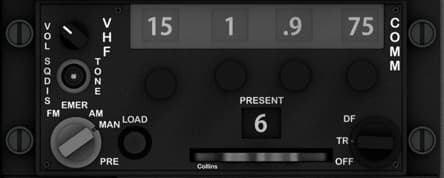
Location Left console, below the UHF Radio panel and adjacent to the intercom and antenna select panels. Purpose Provides control of the VHF FM communication radio, used primarily for close air support and communication with ground units. Allows the pilot to select preset or manual frequencies, adjust volume and squelch, and configure transmission modes. Controls VOL / SQDIS Knob — Dual concentric knob controlling radio volume and squelch disable. VHF / TONE Selector Switch — Enables or disables audio tone output. Frequency Selector Knobs (4 total) — Set the VHF FM frequency manually (e.g., 30.000–87.975 MHz). PRESENT Window — Displays currently active preset channel (1–20). EMER / AM / MAN / PRE / LOAD Selector — Rotary selector for operation mode: EMER: Emergency frequency (default fail-safe). AM: Amplitude modulation (rarely used). MAN: Manual frequency entry. PRE: Preset channel selection. LOAD: Used for programming presets. DF / TR / OFF Selector — Function switch: DF: Direction finding mode (if available). TR: Transmit/receive mode. OFF: Powers down radio. Recommended hardware (simpit) Dual concentric potentiometer (10 kΩ) for VOL/SQDIS. Rotary encoder or multiposition switches for frequency digits. 5-position rotary switch for MODE (EMER–LOAD). 3-position rotary for DF/TR/OFF. 7-segment display or small OLED for PRESENT channel display. Construction 3 mm matte black acrylic or painted aluminum faceplate. White engraved labels; legends illuminated by green LED backlighting. Knobs spaced 17–20 mm; main rotary selector larger (16 mm shaft knob) for realistic tactile feedback. Lighting Subsurface green LED backlight for legends and numeric windows. Edge-lighted acrylic or fiber routing optional for compact builds. Notes (DCS-BIOS) Use the VHF FM Radio module. Each rotary and switch can be mapped to its discrete functions. Preset display can be simulated using an Arduino-driven OLED or LCD module connected to DCS-BIOS. Ensure that the frequency selector encoders wrap around logically between digit positions.

VHF/UHF Radio Control Panel
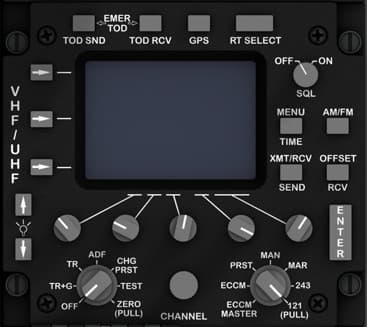
Panel name VHF/UHF Radio Control Panel Location Left console, midsection — directly below the Flight Control and Emergency Override panel. Purpose Provides complete control of the aircraft’s VHF/UHF communications system (ARC-210). Used to tune frequencies, select modes, transmit, receive, and manage encryption and channel presets. Controls Display Screen — Multifunction LCD showing frequency, channel, and mode information. EMER, TOD SND, TOD RCV, GPS, RT SELECT Buttons — Soft-keys for emergency frequency, time-of-day transmission, GPS synchronization, and radio terminal selection. OFF/ON/SQL Rotary Switch — Power and squelch control; “SQL” enables squelch circuit to suppress noise. MENU / AM-FM / TIME / OFFSET / SEND / RCV Buttons — Access configuration menus, select modulation type, adjust clock and frequency offset, and control transmission and reception functions. ENTER Key — Confirms data entry for frequencies or menu items. VHF/UHF Selector Toggle — Two-position toggle to switch between VHF and UHF radio systems. ADF / TR+G / ZERO (PULL) — Rotary selector for auxiliary direction finding and guard channel settings, with pull-to-zero function for quick reset. CHG / PRST / TEST Rotary Knob — Controls channel mode: manual frequency input, preset recall, or built-in test. CHANNEL Knob — Large central encoder or potentiometer used to select frequency or preset channel. PRST / MAN / MAR / 243 Selector — Four-position rotary switch for preset mode, manual tuning, maritime channel, or guard frequency (243 MHz). ECCM MASTER Knob (121 PULL) — Enables anti-jam (Electronic Counter-Countermeasures) features; pull for secure channel. Recommended hardware Display: 1 × 4"–5" TFT or OLED screen (if simulated). Rotary selectors: 3 × 4-position rotary switches (OFF/ON/SQL, PRST/MAN/MAR/243, ECCM). Encoders: 2 × rotary encoders for CHANNEL and ADF control. Pushbuttons: 10 × momentary tactile buttons for mode and function keys. Toggle: 1 × 2-position ON-ON for VHF/UHF selection. Construction 3 mm matte black acrylic faceplate with engraved white legends. Buttons should be 6–8 mm square tactile caps; rotary spacing 18–20 mm. LCD recess depth: 2–3 mm flush to panel face. Lighting Green LED backlighting behind all engraved text. Amber LED optional behind “EMER” and “ECCM” labels for active states. Notes This panel models the ARC-210 VHF/UHF transceiver, allowing secure and non-secure voice and data communication. In DCS-BIOS, many functions are digital — the physical rotary encoders can be mapped to both frequency and preset inputs. Ensure isolation between analog encoder grounds and button rows if shift registers are used.

Yaw & Pitch SAS / Takeoff Trim Panel
Location Left console, below the Signal Lights & HARS/SAS Override panel. Purpose Controls the aircraft’s Stability Augmentation System (SAS) for yaw and pitch axes, provides trim adjustment for yaw, and allows the pilot to perform takeoff trim and monitor system function. Controls YAW SAS (L / OFF / R) — Two guarded three-position toggle switches used to engage or disengage the left and right yaw SAS channels. PITCH SAS (L / OFF / R) — Two guarded three-position toggles controlling the left and right pitch SAS channels. YAW TRIM Knob — Spring-centered rotary control for adjusting yaw trim left or right, providing fine control of rudder alignment. MONITOR TEST Selector (L / R) — Two-position rotary switch for testing SAS monitoring circuits independently for each side. TAKEOFF TRIM Button — Momentary pushbutton that returns pitch and yaw trim actuators to the neutral takeoff position. Recommended hardware Toggles: 2 × ON-OFF-ON (center-off) guarded toggle switches for Yaw and Pitch SAS. Rotary control: 1 × potentiometer or encoder (spring-centered) for Yaw Trim. Selector: 1 × ON-ON toggle or 2-position rotary for Monitor Test. Pushbutton: 1 × momentary pushbutton (illuminated optional) for T/O Trim. Construction Dual-layer panel (3 mm top + 5 mm base) for switch stability and backlighting. Engraved legends in white with “TAKEOFF TRIM” highlighted text for realism. Guarded toggles positioned with 14–16 mm clearance for covers. Lighting Integrated green LED backlight behind legends. Optional amber LED under “TAKEOFF TRIM” for functional indication when pressed. Notes The SAS system ensures stability in turbulent flight and during weapons release. When simulating via DCS-BIOS, map each SAS switch to its corresponding channel (Yaw L/R, Pitch L/R) and debounce inputs to prevent double toggles.
Latest Updates


Project Update — Rethinking Panel Design for Everyone
I paused development of the A-10C panels for a moment to focus more deeply on the electronics side of SIMSTRUCT. After all… what is a body without a soul? The front console is essentially complete — all panels are designed, printed, tested, and the fit is extremely accurate. I’m very happy with how the results are shaping up. However, with the arrival of a new batch of toggle switches, it became clear that I’ll need to revisit some parts of the design, especially the mounting geometry on the back panels. This raised an important question about the future direction of SIMSTRUCT: How can I make the A-10C cockpit files and electronics accessible to everyone, regardless of skill level or component availability? Different builders use different hardware, and even small variations in switch dimensions can become barriers to an otherwise simple build. That goes against my vision — which is to make cockpit construction achievable and enjoyable for all. Because of this, I’m now exploring a “one-size-fits-all” approach for panel design. The idea is to create mounting systems and tolerances flexible enough to support a wide range of switches and components without forcing anyone to hunt for specific hardware. And I would love to hear from the community: What challenges have you faced with panel compatibility? What ideas or suggestions do you have for universal mounting systems? Are there components you think should be prioritized for broad compatibility? Thank you all for following the project and supporting each step of this journey. Much more is coming soon — and your feedback will shape it. See you in the next update.

SIMSTRUCT – Front Console Input Board Update!
(A small pause… but for a very good reason!) Hey everyone! I took a short break from modeling the A-10C panels because I needed to lock down something even more important: the electronics heart that will power the entire front dashboard. Sometimes you have to pause the build to keep the ideas fresh — and trust me, this part was worth the pause. Today I’m sharing a sneak peek of the Front Console Input Board, the “brain” that will handle all the switches, toggles, encoders and sensors from the A-10C front panel. No more cable chaos. No more guessing pins. No more fragile protoboards. Just plug, fly, and smile. 😄 What’s working right now Fully integrated ATmega32U4 (native USB) High-density input matrix with 20 shift registers (160+ digital inputs!) Four 50-pin IDC ports for clean, organized panel wiring Built-in filtering, decoupling, and DCS-ready structure Designed from scratch specifically for the A-10C front console And best of all: It will ship with firmware pre-flashed, DCS-BIOS profiles, naming conventions, and calibration already aligned with the A-10C cockpit logic. You plug it in, connect your switches, and your sim suddenly feels alive. Next milestone I’m now beginning development of the output slave board — the board that will handle backlighting, annunciators, caution lights, and other outputs. Once both boards are complete, the entire front console becomes one clean, integrated ecosystem. What’s coming If all goes well, the full A-10C front console set (inputs + outputs + panel files + wiring guides) should be ready for testing in about one month. ✈️ And beyond… A-10C was my first love, so she had to come first But after she’s complete, I’ll be releasing plane-specific electronics for multiple aircraft. Why plane-specific? Because every aircraft deserves its own optimized, precise electronics. No improvisation. No wrestling cables. No guessing pins. Just: ✔️ Plug in your console ✔️ Load your profile ✔️ And fly. Community Support Coming Soon Over the next 2 weeks, I’ll be launching: A Patreon with supporter tiers (behind-the-scenes progress, early access files, exclusive perks) The official SIMSTRUCT website, where you can follow development and access resources, files, instructions, tutorials and more. And in about 3 weeks, I’ll open the Interest List + Pre-Order Pipeline for those who want to secure their spot for the first production run. Your feedback and support mean the world to me — and they help push this project forward faster. I will keep posting Hope you enjoy the preview! Let me know what you think!

Fusion 360 Design
The design of the entire Front Console was made modular following a calibrated photo of the cockpit. A real world dimension was obtained form one panel and applied to the photo, so by proportion all the panels aligned and became at scale with the real console. The design had to take in consideration that an LCD panel will be placed in the back to provide instrument readings via Helios, so the panel could not pass that plane. This obliged me to go slightly away from the real proportion and add some additional depth to it. ( Which it turns out looked good in my opinion and made it bulkier) To facilitate with the electronic assembly, I decided to make it in 4 layers. The first layer was the frame that attaches to the console build structure and to the back panel of the AHCP. The back panel is a 5 mm part that will house the toggle switches. Many trial and errors had to be done in order to find the appropriate tolerances to properly fit the switches in the slots. The next layer comprises of a faceplate that will house the backlighting. I made small 3 mm holes ( With appropriate tolerance) to fit in the LEDs that will shine on the next layer plate. The fourth and last layer is the acrylic decal plate where the labels are engraved (see the fab/laser section for more detail)
Support This Build
Become a member to access exclusive content and full project downloads.
Join as Supporter